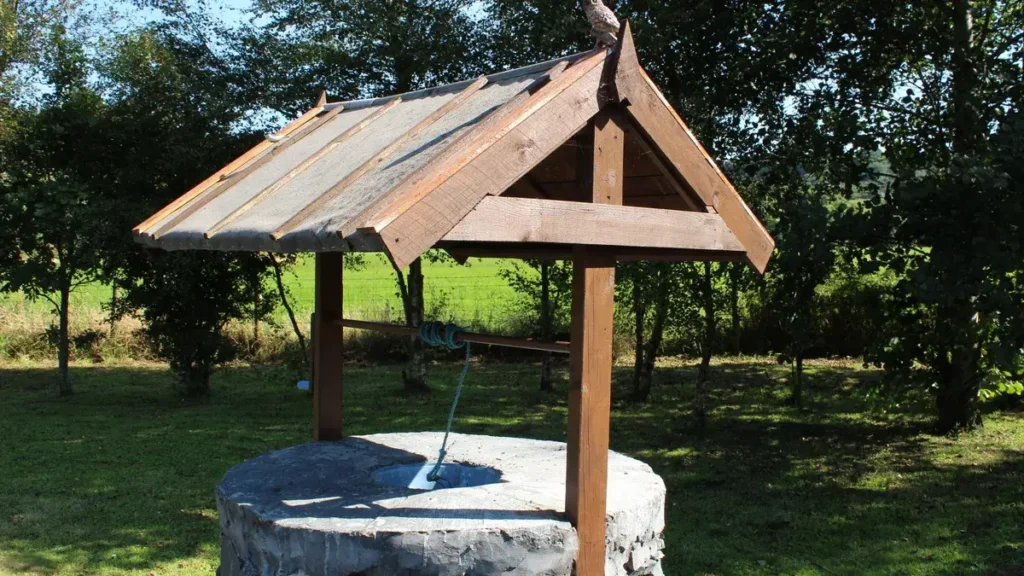
A wishing well looks like the simplest thing in the garden. A round drum of stone or brick, four timber posts, a little pitched roof and a bucket hanging on a rope. There is no pump to size, no water to keep clear and no liner to wrinkle. Yet a wishing well that still looks right after five winters is a small building project in disguise, and the startups that build them well treat it as one.
Before the first stone is laid, somebody has to agree the design with the client, measure a corner of a garden that is rarely flat, price the stone, brick, timber and roofing, work out how the structure will be anchored, and schedule a crew around the weather. Get the footing wrong and the well leans. Get the roof pitch wrong and rain runs down the posts and rots them. Get the quote wrong and a charming two-day job quietly loses money.
Artificial intelligence will not lay a single stone or cut a single roof joist. What it can do is take the work around the install and make it faster, steadier and easier to sell: showing a client what the well will look like in their own garden, turning a site visit into an accurate quote, keeping jobs, crews and invoices in order, and following up so that one happy garden leads to the next. This guide compares the nine best AI tools for wishing well installation startups in 2026, chosen for small craft-led teams rather than big landscaping firms.
Key takeaways
- A wishing well is a dry garden structure, not a water feature, so the tools that matter most are design visualisation, estimating and job management rather than pump or water calculations.
- Show the client a realistic 3D view of the well in their own garden before you quote, because most wishing well sales are won on looks, not on price.
- Price stone, brick, timber and roofing as separate line items, and let your estimating tool carry the maths, so small jobs stay profitable.
- Keep every install photographed and filed the same day, because a tidy photo record is what turns one garden job into referrals from neighbours.
- Start with three tools only, design, estimating and job management, and add marketing and review tools once the first ten installs are done.

The best AI tools for wishing well installation startups at a glance
| Tool | Best for | Starting point |
|---|---|---|
| Cedreo | 3D wishing well designs clients can see | Design and visualisation |
| VizTerra | Realistic garden scenes with the well in place | Design and visualisation |
| Planner 5D | Quick layout mock-ups on site | Design and visualisation |
| Buildxact | Estimates for stone, brick and timber work | Quoting and estimating |
| Jobber | Quotes, scheduling and invoicing in one place | Job management |
| Housecall Pro | Dispatch, payments and customer messages | Job management |
| Raken | Photo records and daily site reports | Site records |
| Thryv | Customer records, marketing and follow-ups | Customer management |
| NiceJob | Reviews and referrals after every install | Reputation |
Why wishing well installation is a different kind of startup
A wishing well business sits in a gap between garden ornament suppliers and small builders, and that gap shapes everything about the work. The product is decorative, so the client judges it the way they would judge a piece of furniture, but the build is structural, so it has to survive frost, wind and rain. A well that looks lovely on delivery day and leans by spring is a refund, a bad review and a lost neighbourhood all at once. The startup that lasts is the one that treats the pretty part and the structural part with equal respect.
The first difference is that there is no water involved. A fountain installation startup has to think about pumps, plumbing, power and water quality from the first site visit, and a single wrong pump size can ruin the whole job. A wishing well has none of that. The engineering questions are about footings, anchoring, load and weatherproofing: will the drum sit level on this ground, will the posts stay plumb, will the roof shed rain away from the timber, and will the bucket mechanism still turn smoothly after a wet winter. That makes the skill set closer to masonry and carpentry than to plumbing, and it changes which software earns its keep.
The second difference is the size and shape of the job. Most wishing well installs take one to three days, involve a crew of two or three, and happen in a lived-in garden where the client is watching. Access is often tight, through a side gate or across a lawn that must not be churned up, and the finished well has to sit comfortably beside planting, paths and fences. Tools that help you plan the footprint, protect the lawn and sequence the work in a small space matter far more than tools built for big earthmoving projects.
The third difference is who buys. Homeowners buy wishing wells as a garden centrepiece, often to mark a wedding, an anniversary or a new home. Garden centres, pubs, hotels and wedding venues buy them as a feature that guests photograph, which means the finish has to be flawless and the install has to be tidy. Both kinds of buyer decide largely on appearance, so the ability to show a realistic picture of the finished well in their own garden is often the difference between a signed quote and a polite maybe.
The fourth difference is that the work is seasonal and visual. Spring and early summer bring a rush of garden projects, autumn brings repair and re-roofing work, and winter is quiet. A startup that photographs every install well, keeps those photos organised, and follows up with past clients before the spring rush will fill its diary far more cheaply than one that buys advertising all year. The tools in this guide were picked with that rhythm in mind.
How to choose AI tools for a wishing well installation startup
Start with the job, not the software. A tool earns its place only if it removes a real bottleneck: a client who cannot picture the finished well, a quote that takes an evening to write, a crew that turns up without the right materials, or a happy customer whose praise never reaches the internet. Write down the three tasks that eat the most of your week, then match tools to those tasks first and ignore everything else until the business grows.
Look for tools that work on a phone in a garden. Much of this work happens outdoors, with muddy hands and patchy signal, so a beautiful desktop-only system that nobody opens on site is wasted money. The design tool should let you sketch a layout while standing in the client’s garden, the quoting tool should turn that sketch into a price before you drive home, and the job app should let the crew tick off tasks and photograph progress without coming back to the office.
Favour simple pricing that fits small jobs. A wishing well install might be worth a few hundred to a few thousand pounds or dollars, so a tool that charges per user per month needs to pay for itself across a handful of jobs. Free trials matter here: run each candidate through one real quote and one real install before committing, and check how hard it is to cancel. The cheapest tool is rarely the best, but the most expensive one is almost never right for a two-person startup.
Check that the tools work together, or at least export cleanly. The design, the quote, the schedule and the invoice should flow from one record of the job, not live in four separate systems that need retyping. A client who changes the roof style should not force you to update the price in three places.
Finally, judge the AI honestly. Useful AI in this trade does quiet, verifiable work: turning measurements into a materials list, drafting a quote from a template, or tagging site photos. Be wary of any tool that promises to design the well for you with no human check. The best tools make a skilled installer faster; none of them replace the skill.
The 9 best AI tools for wishing well installation startups
1. Cedreo for 3D wishing well design
Cedreo is a 3D home and garden design tool that lets a small team draw a wishing well, place it in a model of the client’s garden, and show the result as a realistic rendered image. For a wishing well startup, that matters because the sale is visual: a client who can see the stone drum, the timber posts and the pitched roof sitting beside their patio is far more likely to say yes than one staring at a flat sketch. You can adjust the roof style, the stone colour and the height in minutes, and the client can compare two or three versions side by side before committing.
The AI-assisted rendering does the heavy lifting on light, shadow and texture, so a design that would once have needed a specialist visualiser can now be produced the same evening as the site visit. Cedreo also produces measurements and material quantities from the model, which means the picture the client approved and the materials list the crew works from come from the same source. That single fact prevents a surprising number of arguments about what was agreed.
Best for: startups that sell on design and want clients to approve a realistic 3D view before work begins. Watch out for: the learning curve on your first few models, so practise on your own garden before using it live with a paying client.
2. VizTerra for realistic garden scenes
VizTerra is a landscape design tool built around realistic 3D scenes, and it suits wishing well installers because it treats the garden as the whole picture rather than the well alone. You can model the lawn, the beds, the path and the fence, then set the well into the scene and walk the client through it from different angles. That context is exactly what a client needs: they are not buying a well in isolation, they are buying how it will look from the kitchen window and the patio chairs.
The software includes libraries of plants, paving and garden features, so a scene can be dressed to look like the real garden rather than a blank plot. Its rendering handles sunlight and shade convincingly, which helps when a client worries the well will sit in gloom under a tree. For venues and garden centres, a VizTerra scene can be the centrepiece of the proposal itself.
Best for: installers pitching to venues, garden centres and design-conscious homeowners who want to see the whole garden. Watch out for: the time a detailed scene takes to build, so keep a few template gardens ready and adapt them rather than starting from scratch each time.
3. Planner 5D for quick layout mock-ups on site
Planner 5D is a simpler 3D design app that runs well on a tablet or phone, and its strength for a wishing well startup is speed. Standing in a client’s garden, you can sketch the plot, drop in a well of roughly the right size, and show the client the layout within minutes. It will not produce the polished renders that Cedreo or VizTerra can, but it answers the question clients ask first: will it fit here, and will it look right from the house?
The app’s AI-assisted room and garden tools help with measurements and layout, turning a rough sketch into something dimensioned enough to quote from. Because it is cheap and easy to learn, it is a good first design tool for a new startup, and a good companion tool for a crew leader who needs to check a layout on site without calling the office. The mock-up can be shared with the client the same day, keeping the momentum of the visit alive.
Best for: fast on-site mock-ups and early-stage startups that need a design tool today, not after a week of training. Watch out for: its simpler rendering, so use it for layout and fit, and step up to a fuller tool for the final client presentation.
4. Buildxact for estimates on stone, brick and timber work
Buildxact is estimating and job management software aimed at small builders, and it fits wishing well work because the costs are all in materials and labour rather than in plant or subcontractors. You can build a template for a standard well, stone or brick drum, timber posts and roof, bucket and rope, fixings and finish, then adjust quantities for each job. The software prices the template, adds labour and margin, and produces a quote that looks professional and is easy for the client to understand.
The AI-assisted take-off features help turn measurements into a materials list without missing the small items that eat margin: fixings, sealant, roofing felt, paint or stain, and the delivery charge for a pallet of stone. Buildxact also tracks the quote through to the job, so the estimate, the purchase list and the final invoice stay linked. For a startup doing ten or twenty wells a season, that discipline is the difference between a busy year and a profitable one.
Best for: accurate, repeatable quotes for craft-built wells where materials are the biggest cost. Watch out for: the need to set up your own price lists first, so budget a day to enter your real supplier prices before relying on it.

5. Jobber for quotes, scheduling and invoicing
Jobber is field-service software that covers the whole job, from the first enquiry to the final payment, and it is the natural hub of a wishing well startup’s back office. A client enquiry becomes a quote, the accepted quote becomes a scheduled job, the job generates the invoice, and the payment is chased automatically if it is late. The AI features help with the routine writing: drafting quote follow-ups, summarising job notes and suggesting the next step when a quote goes quiet.
For a small crew, Jobber’s scheduling view is the daily truth: who is where, which well is being built, what materials need to be on the van, and which client needs a call. The mobile app lets the crew check in on site, record time and materials, and photograph the finished well before they leave. Because the client record holds the whole history, a returning customer who wants a matching well for a second property, or a repair to the first, can be quoted in minutes.
Best for: startups that want one system running quotes, diary, invoicing and client records. Watch out for: paying for features you do not use in year one, so start on the smallest plan that covers quoting and scheduling, and upgrade when the diary fills.
6. Housecall Pro for dispatch, payments and customer messages
Housecall Pro is another field-service platform, and its strengths for a wishing well installer are dispatch and payment. When two crews are working different gardens, the dispatcher can see both jobs, move a start time, and message the client without a chain of phone calls. Clients can approve a quote and pay a deposit online, which is a genuine advantage for a decorative purchase that clients often decide on impulse after seeing a design.
The software’s AI-assisted messaging drafts appointment reminders, on-my-way texts and follow-up notes, keeping clients informed without the installer stopping work to type. Its review and marketing tools nudge happy clients toward leaving feedback, and its reporting shows which kinds of job, and which neighbourhoods, are the most profitable. For a startup that plans to grow from one crew to two, those dispatch and payment features remove a lot of friction.
Best for: installers running more than one crew, or taking deposits and card payments on decorative garden work. Watch out for: overlap with Jobber, so pick one field-service hub rather than running both and duplicating records.
7. Raken for photo records and daily site reports
Raken is a construction reporting app that makes it easy to keep a photo and note record of every install, and for a wishing well startup that record is worth real money. Each job gets a daily log: photos of the footing, the drum going up, the roof frame and the finished well, plus notes on materials used and any problems found. The AI tagging sorts photos by job and stage, so finding the picture of a particular well two years later takes seconds rather than an afternoon of scrolling.
Those records protect the business when a client queries the work, prove the quality of the build to the next client, and provide the before-and-after photos that marketing runs on. A tidy Raken report can also be shared with a garden designer or venue manager who needs to sign the work off, which speeds payment. For repair and re-roofing work, the original install record tells the crew exactly how the well was built before they arrive.
Best for: installers who want a defensible, searchable record of every build and a steady supply of genuine project photos. Watch out for: the habit it requires, so make the end-of-day photo log part of the crew routine from the very first job.
8. Thryv for customer records, marketing and follow-ups
Thryv is a small-business platform that combines a customer database with marketing, and it suits a wishing well startup because repeat and referral business matters more than cold advertising. Every client, every quote and every install lives in one record, and the software prompts the right follow-up: a thank-you message after the install, a check-in before spring, and a reminder when a roof or bucket needs attention. Its AI drafting helps write those messages in a friendly, personal tone without them all sounding identical.
The marketing tools cover the basics a small installer needs: a simple website presence, social posts built from install photos, and email or text campaigns to past clients. Because Thryv tracks which messages lead to enquiries, the startup can see whether the spring check-in or the photo post did the work, and spend its small marketing budget accordingly. It is not a replacement for good craft, but it makes sure good craft gets remembered.
Best for: turning one-off installs into repeat business, referrals and seasonal maintenance work. Watch out for: its breadth, so use the customer record and follow-ups first, and switch on the marketing tools one at a time.
9. NiceJob for reviews and referrals after every install
NiceJob automates the part of the business that most small installers neglect: asking happy clients for reviews and referrals. After an install is marked complete, it sends a well-timed request for a review, guides the client to the right place to leave it, and then helps turn that review into social proof on the website and in quotes. Its AI tools draft the request messages and suggest the best moment to send them, based on when clients are most likely to respond.
For a wishing well startup, reviews are unusually powerful. The product is photogenic, the client is usually delighted, and the neighbours can see the result over the fence, so a fresh review with a photo of the finished well is the best advertisement available. NiceJob also runs simple referral campaigns, rewarding a client who sends a neighbour your way. In a trade where trust is everything and the product sits in public view, a steady stream of genuine reviews is worth more than any paid advert.
Best for: installers who finish beautiful work and want every happy client to become a public recommendation. Watch out for: asking too soon, so let the client enjoy the well for a few days before the review request lands.
Building your first-year AI stack
Do not buy all nine tools on day one. A sensible first-year stack has three layers. The first layer is design and quoting: pick one design tool, Cedreo or Planner 5D depending on how polished your presentations need to be, and pair it with Buildxact so the picture and the price agree. That combination alone will win you work, because it makes your quotes faster, clearer and more convincing than a competitor’s scribbled estimate.
The second layer is job management, added once the diary holds more than a handful of jobs a month. Choose one hub, Jobber or Housecall Pro, and run every enquiry, quote, schedule and invoice through it. Add Raken at the same time so that every install leaves a proper photo record, because the record you build in year one becomes the portfolio that sells year two. This is also the moment to agree the simple routines: quotes out within 48 hours, photos filed the same day, invoices sent before the crew leaves site.
The third layer is growth, and it belongs in the second half of the year. Thryv keeps past clients warm and brings in the spring rush, while NiceJob turns each finished well into reviews and referrals. A pond installation startup faces the same seasonal rhythm, and the lesson is identical: the cheapest new customer is the neighbour of a happy old one. Measure the stack every quarter, keep what demonstrably saves time or wins work, and cancel what nobody opens.
Checklist: launching a wishing well installation startup with AI
- Choose one design tool and build three template wells, small, standard and grand, so every quote starts from a proven model.
- Set up your estimating template with real supplier prices for stone, brick, timber, roofing and fixings, and test it on two past jobs.
- Pick one job management hub and run every enquiry through it, so no quote is ever lost in a notebook or a text message.
- Photograph every stage of every install and file the photos the same day, with the client name and the job date.
- Ask every happy client for a review within a week of the install, and reply to every review personally.
- Review the whole stack quarterly, cancel the tools nobody uses, and spend the saving on materials or training.
Frequently asked questions
How much should a wishing well installation startup spend on AI tools?
Budget for three tools in the first year, design, estimating and job management, and expect the combined cost to be roughly the price of one small install per month. That sounds like a lot until the first quote you would otherwise have lost pays for a quarter of it. Add marketing and review tools only once the diary is filling, and review every subscription quarterly, cancelling anything the team has not opened in a month.
Can AI really design a wishing well accurately enough to build from?
AI design tools are excellent at showing a client what the well will look like and at producing measurements and materials lists, but the final build still needs a human check. Always verify footing depths, post sizes, roof pitch and anchoring yourself, and treat the rendered image as a sales and planning aid rather than an engineering drawing. The tools make a skilled installer faster; they do not replace the judgement that keeps a well standing.
Do I need a drone to measure a garden for a wishing well?
No. A wishing well occupies a small footprint, usually a couple of metres across, and a tape measure, a level and a phone camera are enough for most gardens. A drone can help on a very large property or a venue with complex levels, but for the typical residential install it adds cost and hassle without improving the quote. Spend the money on a good design tool instead.
What is the most common mistake new wishing well installers make?
Under-pricing the job by forgetting the small costs and the groundwork. The stone and timber are obvious, but the footing, the delivery, the fixings, the roofing felt, the finish and the time spent protecting the lawn all cost money. A proper estimating template that lists every item is the cure, and a photo record of the finished well protects you if a client later claims the work was not as agreed.
Will customers mind that an AI answers their calls?
Most will not, provided the experience is smooth and a human takes over quickly when the question is specific. Use AI for the routine parts, taking the enquiry, confirming a visit time, sending the quote, and make sure a real person handles design choices and problems. Clients buying a decorative centrepiece for their garden expect a personal service, so the AI should make the human contact faster and warmer, not replace it.
How do I keep customers coming back after the install?
A wishing well needs occasional care, a re-stained roof, a replaced rope or bucket, a re-pointed drum, and that care is your repeat business. Keep a record of every install with its materials and date, check in with the client before spring, and offer a simple maintenance visit. A short message with a photo of their well looking its best is often all it takes, and it keeps your name in front of exactly the people most likely to recommend you.
The bottom line
A wishing well installation startup succeeds on craft, presentation and follow-through, and the right AI tools strengthen all three. A realistic 3D design wins the sale, a careful estimate keeps the job profitable, a tidy job system keeps the crew organised, and a simple review routine turns each finished well into the next enquiry. Start with three tools, build the habits around them, and add the rest as the diary fills. The well itself is old-fashioned, stone, timber and rope, but there is nothing old-fashioned about running the business behind it well. For the wider garden picture, the same disciplined approach works across landscaping startups, where design, quoting and reputation matter just as much.

Keep what speaks to you.
Leave room for your own perspective.