A charcoal kiln installation startup builds the place where wood becomes charcoal. That sounds simple until you stand in front of a half-built kiln with a lorry-load of timber, a client asking when the first burn will happen, and a plume of smoke that tells you the air seals are not doing their job. The kiln is a slow oven, not a bonfire: timber is stacked tight, starved of oxygen, and cooked for days until what is left is carbon. Get the stack wrong and you get ash. Get the seals wrong and you get a fire. Get the cooling wrong and you get a kiln that cracks, or charcoal that crumbles to dust in the bag.
That is why the tools in this guide exist. None of them lights the kiln for you, and none replaces the person who has learned to read the smoke. What they do is take the guesswork out of the parts that used to be pure experience: how much timber goes in, how long the burn should run, when the kiln is cool enough to open, and what the finished charcoal is worth.
This guide compares nine AI tools built around the charcoal kiln itself: the timber feed, the charring cycle, the seals, the cooling, the grading, and the dust. Each one is judged on the same question — does it help a small installation crew deliver a kiln that burns evenly, cools safely, and produces charcoal a buyer will pay for? The answer, for most startups, is to start with two or three tools and add the rest as the order book grows.
Key takeaways
- A charcoal kiln burns wood slowly with very little oxygen, so the tools that matter most watch the burn, the seals, and the cooling — not the flames.
- Start with a timber feed tool, a burn-cycle planner, and an estimator: those three decide whether a job makes money before the first log is stacked.
- Cooling is where most new kilns fail, so plan the cool-down with the same care as the burn and never open a kiln on a guess.
- Charcoal dust is a real health risk on every job, and dust monitoring belongs in the budget from the first installation, not as an afterthought.
- Grading the finished charcoal — by size, density, and breakage — is what turns a pile of black lumps into a product with a price.

What a charcoal kiln installation startup actually does
A charcoal kiln installation startup does not sell charcoal. It builds the kiln that makes it, and it hands the owner a working system: a prepared site, a kiln body that holds heat, air controls that can be trusted, and a first burn that proves the whole thing works. The client might be a woodland owner with timber to use, a farm diversifying into charcoal, or a small producer replacing a kiln that has reached the end of its life. In every case the startup is selling a working burn, not a pile of bricks or steel.
The work starts with the site. A kiln needs level ground that drains, room for timber stacks and charcoal storage, access for a vehicle, and a safe distance from anything that can catch fire. The ground has to take the weight of a loaded kiln without shifting, because a kiln that settles unevenly will crack its seals and leak air. A good survey catches the slope, the drainage, and the access problems before the build starts, when fixing them costs hours instead of days.
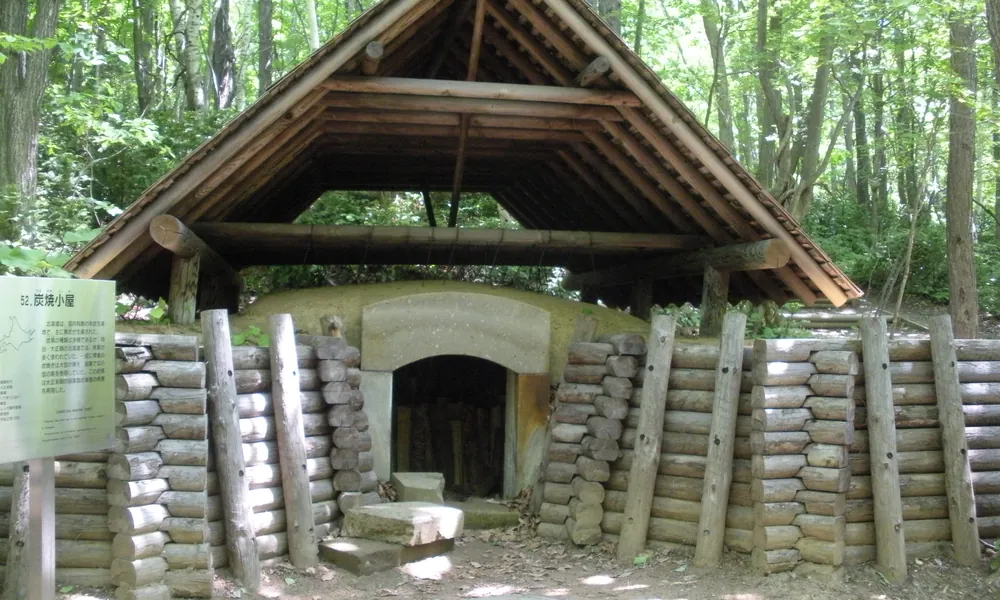
Then comes the build itself. A traditional earth kiln or charcoal pile is shaped from stacked timber, covered with turf, clay, or soil, and sealed so that only a small, controlled amount of air gets in. A steel retort kiln is a different machine: a sealed chamber, a chimney, and controlled vents. Either way, the same things decide the result. The timber has to be cut to size and stacked tight, with no big air gaps. The seals have to hold. The vents have to open and close cleanly. And the crew has to know, at every hour of the burn, what is happening inside a chamber they cannot see into.
The burn is the long middle of the job. Depending on the kiln and the timber, it can run for two days or two weeks. The crew watches the smoke colour, the temperature at the vents, and the smell of the exhaust, and adjusts the air a little at a time. Too much air and the wood burns to ash. Too little and the burn stalls, leaving half-charred timber in the middle of the pile. When the burn is done, the kiln is sealed completely and left to cool — often for as long as the burn itself — before anyone opens it. Opening a hot kiln is how charcoal catches fire and how people get hurt.
Finally there is the grading and the handover. The charcoal comes out, gets sorted by size, and the dust and fines are separated from the saleable lumps. A startup that grades well can tell the client exactly what the kiln produced and what it is worth. That matters, because the client is judging the whole installation on that first load. A related guide to outdoor kiln installation tools covers a different kind of kiln — one built for firing rather than charring — and it shows how much of the installation discipline, from site surveys to safety sign-off, carries across kiln types.
How to compare the nine tools
Compare these tools by the stage of the job they serve, not by their feature lists. A tool that is brilliant at grading charcoal is no help if your problem is pricing the build, and the best burn planner in the world cannot fix timber that arrived wet and oversized. Walk the job in order — site, timber, build, burn, cooling, grading, handover — and buy the tool that removes the biggest risk at the stage where your crew is weakest. Most new startups are weakest at the burn and the cooling, because those are the stages you cannot see.
Price matters, but not in the way brochures suggest. The cheapest tool is the one that stops a single failed burn, because a failed burn wastes the timber, the crew days, and the client’s trust in one stroke. Ask every supplier three questions before you buy: does it work without a signal on a woodland site, does it export a record the client can keep, and can one person run it while the rest of the crew keeps working? If the answer to any of those is no, the tool will sit in the van while the job goes on without it.
| Tool | Best for | Start here if… |
|---|---|---|
| TimberFeed Scout AI | Sizing and grading timber feedstock | Your timber arrives mixed, wet, or oversized |
| CharCycle Planner | Planning the burn cycle hour by hour | Your burns run long or finish unevenly |
| KilnSeal Sense | Air-seal and oxygen control | Your kilns leak air or burn to ash |
| EmberWatch AI | Watching ember temperatures safely | You open the kiln too early or too late |
| CoolDown Planner AI | Planning the cooling phase | Your kilns crack or your charcoal crumbles |
| CharGrade AI | Grading finished charcoal | Your charcoal sells at one flat price |
| DustGuard Sense | Charcoal dust monitoring | Your crew works in dust all day |
| CharKiln Estimator | Pricing an installation | Your quotes keep missing the real cost |
| CharYield AI | Forecasting charcoal yield | Your clients ask what a load is worth |
The nine tools, in job order
1. TimberFeed Scout AI: best for sizing and grading the timber feedstock before it goes in
TimberFeed Scout AI starts where every charcoal job starts: the wood pile. It takes photos and measurements of the timber on site and scores each load for the three things that decide a burn — piece size, moisture, and species mix. Timber that is too thick chars on the outside and stays raw in the middle. Timber that is too wet spends the first days of the burn boiling off water instead of charring. Timber of mixed species burns at mixed rates, so the outside of the pile finishes long before the centre.
On a real job, the crew walks the timber stack with a phone, and the tool flags the pieces that need cutting down and the loads that need more drying time. That sounds like a small thing, but it is the difference between a kiln that burns evenly and one that leaves a core of half-burned wood. The tool also keeps a record of what went into each kiln, so when a burn goes well — or badly — the startup can look back and see exactly what timber was in it.
The limit is that the tool can only judge what it can see. It cannot measure the moisture deep inside a thick log, and it cannot tell you that a load has been sitting in the rain for a week unless someone tells it. Use it as a fast first pass, and keep a moisture meter on the crew for the pieces that matter. For a startup, it earns its place by cutting the sorting time on the first morning of a job and by stopping bad timber from going into a kiln at all.
2. CharCycle Planner: best for planning the burn cycle, hour by hour
CharCycle Planner turns the burn from a matter of instinct into a written plan. You feed in the kiln type, the timber load, the moisture readings, and the weather, and it builds an hour-by-hour schedule: when to light, when to close the vents down, when the burn should reach the centre of the pile, and when to seal the kiln for cooling. The plan is a guide, not a prison — the crew still adjusts to what the kiln is doing — but it gives a new crew a line to follow instead of a blank week.
The value shows up on the second and third jobs. Each completed burn feeds back into the planner, so the schedule for the next kiln of the same size and timber is closer to reality than the last one. Over a season, a startup builds a small library of burn plans that match its own kilns and its own timber, and that library becomes one of the most valuable things the business owns. A client who can see a written burn plan trusts the job more than one who is told to wait and see.
3. KilnSeal Sense: best for air-seal and oxygen control during the burn
KilnSeal Sense watches the one thing a charcoal kiln cannot afford to get wrong: how much air is getting in. A charcoal kiln is a sealed chamber with a small, controlled air supply, and the whole craft is keeping that supply low enough to char the wood without burning it. A crack in the covering, a vent that does not close, or a seal that shifts as the kiln settles can let in enough air to turn a load of timber into ash while the crew is asleep.
The tool uses small sensors placed at the vents and around the kiln body, and it raises an alert when the airflow or the temperature pattern suggests a leak. On a steel retort kiln that means a gasket or a door seal. On a traditional covered pile it means a patch of turf or clay that has dried and split. Either way, the alert arrives while the problem is still small — a seal that can be patched in minutes rather than a burn that is lost overnight.
The practical question is power and signal. Sensors on a woodland site need batteries that last the whole burn, and the crew needs alerts that reach a phone in a pocket, not a dashboard in an office. Check the battery life against your longest burn, and test the alerts on site before you depend on them. For a startup, this is the tool that protects the load while nobody is watching, and that is exactly when most burns are lost.
4. EmberWatch AI: best for watching ember temperatures without opening the kiln
EmberWatch AI answers the question every charcoal crew asks a dozen times a day: how hot is it in there, and is the burn where it should be? It reads temperature probes placed through the kiln wall and builds a simple picture of the ember bed — where it is hottest, whether the heat is moving evenly through the pile, and whether any part of the load is lagging behind. The crew sees the picture on a phone instead of guessing from the smoke and the warmth on the kiln wall.
That picture changes how a crew works. Instead of opening a vent to have a look — which lets in air and disturbs the burn — the crew checks the screen and adjusts in small steps. A cold patch in the middle of the pile shows up hours before it would show up as unburned timber at the end, which means the crew can fix it while there is still time. For a new startup, that early warning is worth more than any other feature, because it turns a failed load into a saved one.
5. CoolDown Planner AI: best for planning the cooling phase safely
CoolDown Planner AI handles the part of the job that new crews underestimate most: the cooling. When the burn finishes, the kiln is sealed and left alone, and the charcoal inside stays dangerously hot for days. Open the kiln too early and the charcoal meets fresh air and catches fire. Wait too long and the job runs over schedule and the client waits. The planner works out a cooling schedule from the kiln size, the load, and the temperature readings, and tells the crew the earliest safe day to open.
The schedule also covers what happens while the kiln cools. It plans the checks — temperature at the vents, warmth on the kiln wall, any smell of smoke that suggests air is still getting in — and it sets the point at which a cooling kiln needs attention rather than patience. That matters because a kiln that is cooling badly is a kiln that will crack, and a cracked kiln is a kiln that has to be rebuilt. A good cooling plan protects the kiln itself, not just the charcoal inside it.
The temptation is to rush it, especially when the client is waiting and the next job is booked. The planner’s job is to give the crew a number they can point to — a date and a temperature — instead of a feeling. Put the cooling dates in the client handover from the start, so nobody is surprised by the wait. A startup that opens kilns on schedule, and never on a guess, keeps its kilns, its charcoal, and its crew intact.
6. CharGrade AI: best for grading finished charcoal by size and density
CharGrade AI sorts the charcoal after the kiln is opened, and sorting is where the money is. A load of charcoal is not one product. The large, dense lumps are the premium grade that restaurants and barbecue buyers pay for. The medium pieces suit home use. The small pieces and dust go to briquettes or industrial buyers at a lower price. A crew that bags everything together sells premium charcoal at the price of the cheapest grade in the bag.
The tool grades by photo and weight: the crew spreads a sample on a sorting table, the tool measures piece sizes and estimates density, and it suggests the split between grades. Over a season, that grading record tells the startup which kilns, timber, and burn plans produce the most premium charcoal — and that is the information that decides which jobs to take and which timber to buy. It also gives the client a clear, honest account of what the kiln produced, grade by grade.
7. DustGuard Sense: best for charcoal dust monitoring and crew safety
DustGuard Sense is the least glamorous tool on this list and the one a responsible startup buys first. Charcoal dust is fine, black, and everywhere on a charcoal site: in the air when the kiln is opened, in the air when charcoal is graded and bagged, and in the air when the kiln is cleaned out. Breathing it day after day is a real health risk, and it is the kind of risk that does not show up until years later, when it is too late to fix.
The tool places small dust monitors around the work area and tracks exposure through the working day. When the dust level crosses a threshold, it tells the crew to stop, ventilate, damp down, or put on respirators — not as a lecture, but as a simple signal at the moment it matters. It also keeps a record of exposure across jobs, which is the evidence a startup needs for insurance, for client safety checks, and for its own conscience.
The mistake is to buy the monitors and then ignore them. A monitor that beeps all day and gets switched off is worse than no monitor, because it teaches the crew that warnings do not matter. Set the thresholds with the crew, agree what happens when they are crossed, and keep respirators on site and in use. Dust control also protects the charcoal: dust in the air is charcoal that is not in the bag. A startup that takes dust seriously keeps its crew healthy and its product clean.
8. CharKiln Estimator: best for pricing an installation before the builder does
CharKiln Estimator is the tool that decides whether a job makes money, and it does that before a single log is cut. You enter the kiln type, the site conditions, the timber supply, the access, and the crew days, and it builds a costed estimate: materials, labour, transport, sensors, and the contingency for the things that always go wrong on a woodland site. The estimate is broken down line by line, so the startup can see which part of the job is eating the margin.
The value is not just in winning the job. A line-by-line estimate is the plan for the job itself: it tells the crew how many days they have, how much timber to order, and where the budget has no slack. When a client asks for a change — a bigger kiln, a harder site, a faster finish — the estimator shows what the change costs in the same conversation, instead of the startup finding out a week later. That honesty wins repeat work, because clients remember the installer who priced the job straight. The guide to lime kiln installation tools makes the same point for a different kind of kiln — a limestone-burning kiln with its own costing traps — and it is a useful reminder that every kiln type punishes a careless estimate in its own way.
9. CharYield AI: best for forecasting charcoal yield from a timber load
CharYield AI answers the question every client asks before signing: how much charcoal will I get? It takes the timber load — species, size, moisture, and weight — and forecasts the yield: how many kilos of charcoal the kiln should produce, what grades to expect, and what that charcoal is worth at current prices. The forecast is a range, not a promise, and a good tool shows the range honestly, with the low end as clear as the high end.
That forecast does three jobs at once. It helps the client decide whether the kiln is worth building. It helps the startup order the right amount of timber, instead of over-ordering and leaving wood to rot on site. And it sets the expectation for the first burn, so a result at the low end of the range is a conversation, not a dispute. A startup that can show a client a written yield forecast, and then meet it, has a client who will recommend them to the next woodland owner.
Charcoal kiln installation checklist
Use this checklist on every installation, and keep the completed copy with the handover papers. It is the record that the job was done properly, and it is the first thing a client asks for when something goes wrong later.
- Survey the site before quoting: check the level, the drainage, the vehicle access, and the distance to anything that can catch fire.
- Grade the timber before it goes in: cut oversized pieces, set wet loads aside to dry, and record the species mix for the burn plan.
- Write the burn plan and give one person ownership of it, with check-in points at lighting, mid-burn, and sealing.
- Test every seal and vent before lighting, and place the sensors where they can be read without opening the kiln.
- Plan the cooling before the burn starts, and put the earliest safe opening date in writing for the client.
- Grade the finished charcoal, record the yield by grade, and hand the client the grading record with the kiln manual.
Frequently asked questions
What does a charcoal kiln installation startup actually install?
It installs a working charcoal-making system: a prepared site, a kiln body that holds heat, air controls that can be trusted, and a first burn that proves it all works. The kiln can be a traditional covered pile, a brick kiln, or a steel retort. The startup usually stays for the first burn and the handover, and leaves the owner with a burn plan, a cooling schedule, and a grading record.
How long does a charcoal kiln burn take?
It depends on the kiln and the timber, but a small kiln can finish in two or three days and a large traditional pile can take two weeks. Wet timber and thick pieces stretch the burn, while dry, well-sized timber shortens it. The cooling takes as long again, sometimes longer. A startup should give the client the full timeline — build, burn, and cooling — before the job starts, because the cooling is the part clients most often forget to plan around.
Can AI really predict charcoal yield?
It can forecast a range, and the range is useful, but it is not a promise. The forecast depends on the timber that actually goes in — its species, size, and moisture — and on the burn going to plan. A forecast built on honest inputs is usually close. A forecast built on perfect timber is always optimistic. The best use of a yield tool is to compare the forecast with the real result after every burn, so the forecasts get better and the startup learns which timber delivers.
Do I need a licence or permit to install a charcoal kiln?
It depends on where the kiln is and how big it is. Planning rules, smoke control rules, and fire safety rules all vary by location, and a kiln near homes or woodland needs more care than one on open farmland. A startup should check the local rules for every site before quoting, and build the time for any permits into the schedule. The tools in this guide help with the build and the burn, but none of them replaces a check with the local authority.
What is the hardest part of running a charcoal kiln installation startup?
Most installers say it is the waiting. The burn and the cooling take days, and during that time the crew is watching, adjusting, and waiting — while the client wants to know when the charcoal will be ready. The second hardest part is the timber supply: finding dry, well-sized wood at a price that leaves a margin. The tools help with both, by turning the waiting into a plan with check-in points and by grading the timber before it becomes a problem.
Which tool should a charcoal kiln startup buy first?
Buy the estimator first, then the timber tool, then the burn planner. The estimator stops you pricing jobs at a loss. The timber tool stops bad wood going into the kiln. The burn planner gives a new crew a schedule to follow. Once those three are in place, add the seal sensors and the temperature watch, because those are the tools that protect a burn while nobody is watching. Other kiln trades have learned the same lesson in their own way — the guide to oast house installation tools covers a hop-drying kiln, a very different machine, yet its buying order follows the same logic: price the job, check the feedstock, then plan the drying.
The bottom line
A charcoal kiln installation startup lives or dies on the burn. These tools do not change that — they make the burn easier to plan, easier to watch, and easier to repeat. Start with the estimator, the timber tool, and the burn planner, add the sensors when the order book allows, and grade every load before it leaves the site.

Keep what speaks to you.
Leave room for your own perspective.