An aquaponics system installation is two living systems built as one job. Before a single fish goes in or a single seedling is planted, somebody has to size the fish tank, design the grow beds, plan the plumbing that carries water between them, fit the pump and the biofilter, balance the fish load against the planting area, and wire the heaters, lights and sensors so the whole loop keeps running when nobody is watching. Get any one of those steps wrong and the fish suffer, the plants stall, the water turns cloudy, or the customer is left with an expensive tank of green water and a bed of wilted lettuce. That is why an aquaponics system installation startup lives or dies on its process, not just on how good its finished systems look in photographs.
Artificial intelligence will not lift a fish tank into a greenhouse or glue a pipe joint. What it can do is take the work around the install and make it fast, consistent and cheap: turning a photo of a room or a greenhouse into a system layout a customer can approve, sizing the tank, beds, pump and biofilter from a few measurements, watching water chemistry around the clock, logging every feeding and planting, keeping a photographic record of every pipe and cable, and answering the phone while the founder is kneeling beside a sump. This guide compares the nine AI tools that matter most for an aquaponics system installation startup in 2026, from system design and water monitoring to automation, records, quoting and accounting. Every tool below is judged on what a new founder actually needs: a low starting cost, no long contract, useful from the first week, and able to grow with the business from a solo installer to a small crew.
Pick the design, water-monitoring and quoting tools first, then add the automation and record-keeping tools, and only buy the rest once the diary is full. An aquaponics customer is buying food and a living system at the same time, so the tools that prevent a dead fish tank or a failed crop matter more than the tools that only make the paperwork prettier. The stack below is built for that reality: it protects the fish, protects the plants, and still leaves the founder time to sell the next job. A hydroponic garden installation startup works with plants and nutrient water only, while an aquaponics installer has to keep fish alive too, and that extra responsibility shapes every tool choice that follows.
Key takeaways
- Start with three tools only: AI-assisted system design, continuous water-chemistry monitoring, and AI estimating. Everything else can wait until the diary is full.
- Water chemistry is where aquaponics installs go wrong, so use continuous pH, ammonia and temperature monitoring and written water records to protect yourself on every job.
- Fish load, grow-bed area and biofilter size have to balance, so use sizing tools and a written cycling plan before you promise a customer a harvest date.
- Pick tools that charge per month or per job with no long contract, so a quiet month does not punish a young business.
- Keep the human in charge of fish welfare, water safety, electrical safety and customer relationships. AI should speed those decisions up, never make them alone.
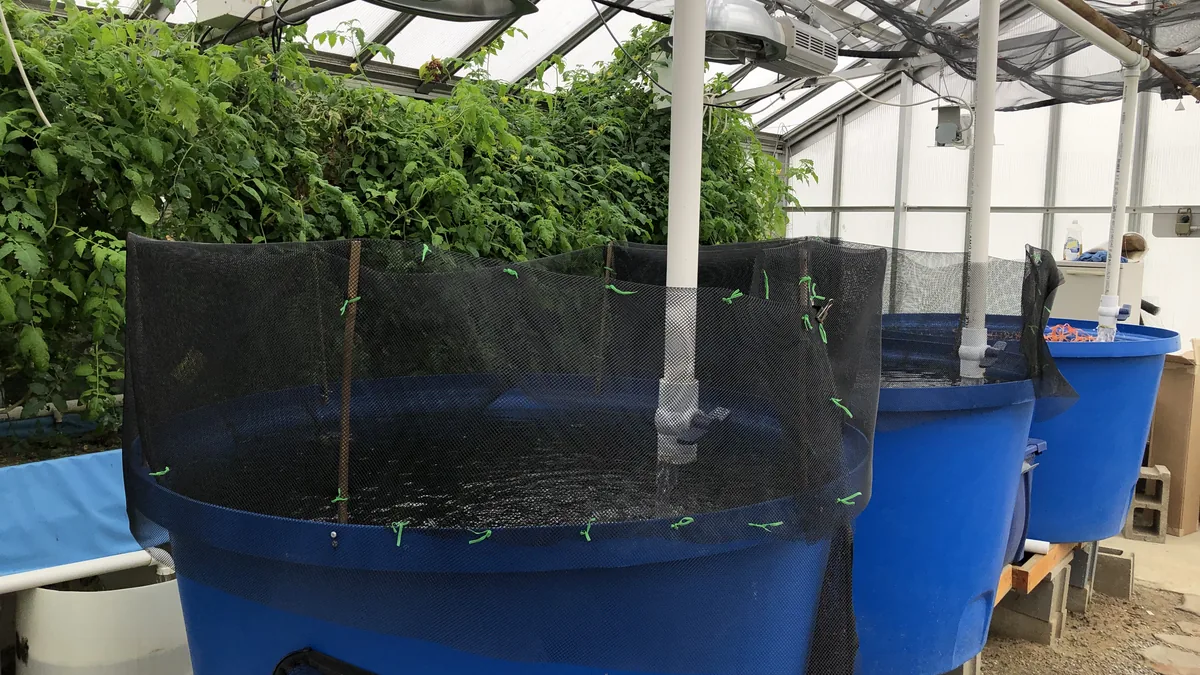
The best AI tools for aquaponics system installation startups at a glance
Use this table to see the whole startup stack before you read the detail. Every row earns its place by winning a job, preventing a dead tank or a failed crop, or saving hours of admin, and the best new installation startups usually pick one strong tool from each row rather than buying everything at once.
| Tool | Best for | Key AI feature | Starting point |
|---|---|---|---|
| Planner 5D | System layout and room design | AI-assisted 3D layouts and photorealistic previews | Free plan, paid plans from about $10 a month |
| Bluelab Guardian Monitor | Water chemistry monitoring | Continuous pH, EC and temperature readings with alerts | Hardware from about $400 |
| Growlink | Grow-bed irrigation and climate | AI scheduling for watering, climate and fertigation | Pricing on request, free trial |
| FarmOS | Fish, planting and harvest records | Open-source farm logs with mapping and task tracking | Free, self-hosted |
| TrolMaster Hydro-X | Environmental control | Automated control of lights, fans, pumps and heaters | Controllers from about $300 |
| Seneye | Ammonia and water alerts | Continuous ammonia, pH and temperature sensing with phone alerts | Devices from about $150, plus slide refills |
| Inkbird | Temperature and humidity control | Smart controllers and sensors with app alerts | Controllers from about $35 |
| Housecall Pro | Quoting, scheduling and invoicing | Job tracking, scheduling and automated client updates | Monthly plan, free trial |
| Xero | Accounting and invoicing | Bank feeds, expense sorting and late-payment reminders | Monthly plan, free trial |
Costs are starting prices for small teams in 2026 and vary by region, plan and number of users. Always confirm the current price and what is included before you buy, and prefer monthly billing until the tool has proved itself on real jobs.
Why aquaponics system installation is a different kind of startup
An aquaponics system installation startup is not an aquarium shop, and it is not a pond company either. An aquarium installer builds a display tank that has to look good and keep ornamental fish alive. A pond installer digs a basin in a garden and balances fish against plants in open water. An aquaponics installer builds a closed loop where fish waste feeds the plants and the plants clean the water for the fish, and if either half of that loop fails, the other half fails with it. The founder has to think like a plumber about pumps, pipe runs and water pressure, like a fishkeeper about stocking, feeding and the nitrogen cycle, like a grower about light, nutrients and crop timing, and like an electrician about safe circuits near water.
Most new founders already know one of those trades well and learn the other two on the job, which is exactly where mistakes happen. A tank that is slightly too small for the grow beds leaves the plants hungry. A biofilter that is slightly too small for the fish load leaves ammonia climbing while the customer is at work. A pump that stops overnight can leave a whole tank gasping by morning. A heater that fails in a cold week can wipe out a tank of tilapia before anyone notices. That is why the tools in this guide lean so heavily towards monitoring and records. A photograph of a finished system is nice for the portfolio, but a logged water reading is what proves the system was healthy on handover day.
The customer is also different. An aquarium customer wants a beautiful tank. A pond customer wants a beautiful garden. An aquaponics customer often wants food: salad leaves, herbs, tomatoes or strawberries, grown at home without soil, and they will judge the installer on the first harvest as much as on the first fill. That means the installer has to plan the planting calendar as carefully as the plumbing, hand over a feeding and testing routine the customer can actually follow, and stay reachable for the first few weeks while the bacteria in the biofilter establish themselves. The tools that help with that handover, the logs, the alerts and the simple instructions, are worth more than a glossy brochure. A greenhouse installation startup shares the controlled-environment work, but only the aquaponics installer has to keep fish alive inside that environment as well.
The nine tools in detail
1. Planner 5D for system layout and room design
Planner 5D is the first tool to open on a new aquaponics job, because the customer has to see the system in their own space before they will pay for it. A fish tank, a set of grow beds, a sump, a biofilter and a tangle of pipes take up more room than most people expect, and a flat sketch does not show how much floor space the system really needs, where the light falls, or how the customer will reach the beds to harvest. Planner 5D turns a floor plan or a set of room measurements into a 3D layout with the tank, beds and walkways in place, and its AI-assisted modelling helps a founder who is not a trained designer produce a clean, believable preview in an evening.
Use it on the first site visit, or on the call straight after it. Measure the room, note the windows, the power points, the water supply and the drain, then build the layout the same day and send it with the quote. The customer can see the tank against the wall, the beds at a comfortable working height, and the space left for access, and that picture does more selling than a page of specifications. It also stops expensive mistakes: a layout that shows the sump blocking a door, or the beds too far from the tank for a short pipe run, is cheap to fix on screen and expensive to fix after the plumbing is glued.
2. Bluelab Guardian Monitor for water chemistry monitoring
The Bluelab Guardian Monitor is the tool that watches the water when the founder is not there. It sits beside the system and reads pH, conductivity and temperature continuously, showing the numbers on a display the customer can read at a glance. In aquaponics those three numbers are the early warning system: pH drifting out of range stresses the fish and locks nutrients away from the plants, conductivity rising or falling shows whether nutrients are building up or running low, and temperature moving too far either way slows the bacteria in the biofilter and stresses the fish.
Fit the monitor on every system you install, or at least on every system above a small home size, and show the customer how to read it on handover day. A customer who can see pH at 6.8 and temperature at 24 degrees and knows those numbers are healthy is a customer who will call early when something changes, instead of calling when the fish are already in trouble. The monitor also gives the installer a record: note the readings at handover, photograph the display, and keep that photograph with the job file. If a customer later says the system failed, the handover readings show the water was balanced when you left.
The Guardian Monitor is hardware, so budget for it in the quote rather than absorbing it as a free extra. It needs its probes kept clean and calibrated, so build a short calibration visit or a clear customer routine into the handover. It does not replace test kits entirely, especially for ammonia and nitrite during cycling, but for day-to-day pH, conductivity and temperature it is the most reliable pair of eyes a small startup can buy.
3. Growlink for grow-bed irrigation and climate
Growlink is the automation tool for the plant half of the system. It controls irrigation timing, climate and fertigation from one dashboard, using sensor readings and schedules to decide when the grow beds flood and drain, when fans run, and when lights switch on and off. In a media-bed aquaponics system the flood-and-drain cycle is the heartbeat of the whole job: too little water and the plant roots dry out, too much and the roots sit waterlogged and the fish tank level drops. Growlink lets the installer set that cycle properly, then adjust it as the plants grow and the weather changes, without driving back to the site for every small change.
Its value shows most clearly on larger installs and on systems in greenhouses, where temperature and humidity swing through the day. A founder can check the dashboard from the van, see that the beds flooded on schedule, and spot a sensor that has stopped reporting before the plants show stress. That remote view also helps with customer support: when a customer rings to say the beds look dry, the installer can check the schedule and the sensor history before deciding whether to visit, instead of guessing over the phone.
4. FarmOS for fish, planting and harvest records
FarmOS is the record-keeping tool for the whole system, and in aquaponics good records are worth more than in almost any other installation trade. It is open-source farm management software that logs plantings, feedings, water tests, harvests and tasks, with maps and timelines that show what happened in each bed and each tank over time. A founder can log how many fish went in, how much they were fed, what was planted in each bed, when it was harvested, and what the water readings were on each visit, all in one place that the customer can also see.
Use it from the first job, even if the first jobs are small. The habit matters more than the software: a startup that logs every feeding and every water test can prove its systems were healthy, can spot a pattern when a crop fails, and can quote the next job from real numbers instead of guesses. When a customer asks how much fish food a system uses in a month, or how long lettuce takes from planting to harvest, the answer should come from the log, not from memory. FarmOS also makes the handover stronger: hand the customer a planting plan, a feeding routine and a testing schedule that are already filled in, and the customer starts with a system they understand.
FarmOS is free and self-hosted, which keeps the cost down, but it does need setting up and learning. Keep the setup simple, use the same log format on every job, and do not try to record everything at once. Fish, feed, water tests, plantings and harvests are enough for the first year. The payoff comes months later, when the logs show which crops pay, which fish grow fastest, and which system sizes cause the fewest call-backs.
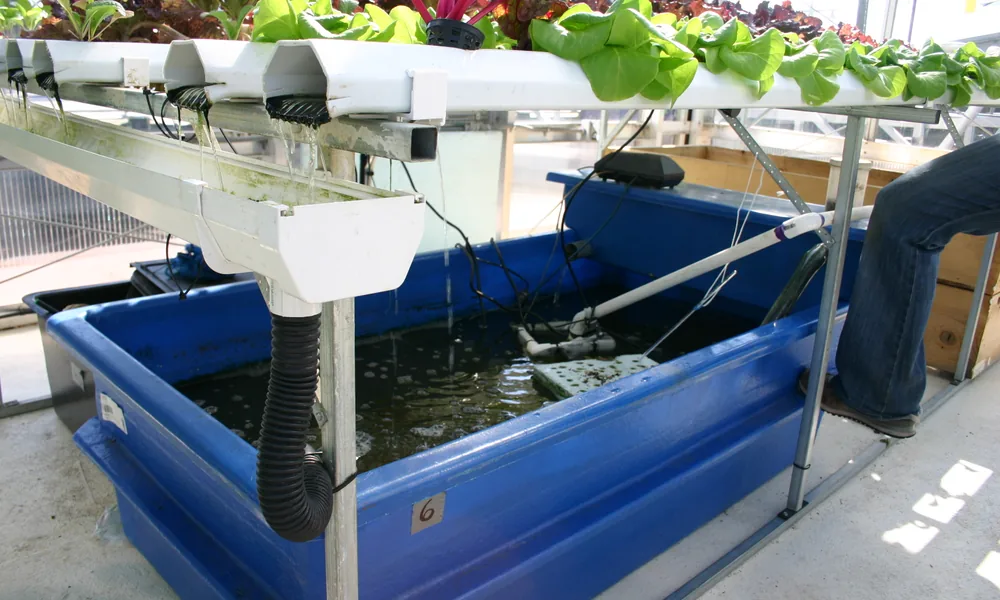
5. TrolMaster Hydro-X for environmental control
The TrolMaster Hydro-X is the controller that ties the environment together. It manages lights, fans, heaters, pumps and other equipment from one unit, switching them on and off against temperature, humidity and light schedules, and linking them so one change does not fight another. In an aquaponics greenhouse that matters, because a heater left running while the fans are off can cook the plants, and lights left on too long can push algae growth in the tank. The Hydro-X keeps the pieces coordinated, so the founder sets the rules once and the system follows them.
Fit it on greenhouse systems and on indoor systems with serious lighting, where the environment needs active control rather than a single timer. Its strength is the way it handles several devices at once: the lights follow a day-length schedule, the fans respond to temperature, the heater only runs when the fans are not venting the warm air away, and the pump keeps its own cycle regardless of the rest. That coordination is hard to achieve with a row of separate timers, and it is where a cheap setup usually fails first.
6. Seneye for ammonia and water alerts
Seneye is the alarm that catches the problem the Guardian Monitor cannot see. Its sensors watch ammonia, pH and temperature continuously, and send an alert to the founder’s phone when ammonia rises or pH moves out of range. Ammonia is the silent killer in aquaponics: fish produce it constantly, the biofilter bacteria convert it, and if those bacteria are not established yet, or if they are knocked back by a cold snap, a cleaning chemical or a power cut, ammonia can climb to dangerous levels in hours while the water still looks clear. A test kit used once a week will miss that climb. Seneye will not.
Fit Seneye on every new system during cycling, when the biofilter is still establishing itself and the risk is highest, and keep it on systems with valuable fish or with customers who travel. The alert is the point: the founder gets a message, rings the customer, and talks them through a water change or a feed reduction before the fish show stress. That one phone call can save a whole tank, and it can save the reputation of a young business that cannot afford a dead tank in its first month.
Seneye uses replaceable sensor slides, so budget for refills in the maintenance plan and show the customer how to change them. It is not a replacement for the Guardian Monitor or for regular test kits, and the founder should say so plainly. Its job is narrower and more urgent: watch ammonia around the clock, and shout early. Used that way, it is the cheapest insurance an aquaponics installer can sell.
7. Inkbird for temperature and humidity control
Inkbird makes the small, cheap controllers that keep the everyday risks under control. Its temperature controllers switch heaters and coolers on and off against a set point, its humidity controllers run fans and humidifiers the same way, and its wireless sensors report temperature and humidity to an app with alerts when the numbers move out of range. In aquaponics those small controls protect the two things that fail quietly: water temperature in the fish tank, and air temperature and humidity around the grow beds.
Use Inkbird controllers on heaters, fans and any cooling, and put a wireless sensor in the fish room or greenhouse so the founder can see the temperature trend without visiting. A heater with no controller can cook a tank if its thermostat sticks. A heater with an Inkbird controller has a second, independent cut-off, and the founder gets an alert if the temperature climbs anyway. That redundancy is cheap, and it is exactly the kind of detail a customer remembers when they recommend the installer to a friend.
8. Housecall Pro for quoting, scheduling and invoicing
Housecall Pro is the business tool that keeps the diary, the quotes and the invoices in one place. It builds branded quotes with photos, schedules site visits and install days, tracks each job from first call to final invoice, and sends automated updates so the customer knows when the crew is coming and what happens next. For an aquaponics startup that means the founder can quote a system, book the install, record the water readings, and send the invoice without juggling a notebook, a spreadsheet and three different apps.
Its strength is the way it handles the follow-up work that aquaponics creates. A system install is not finished on the day the plumbing is done: the tank has to cycle, the fish go in later, the plants go in after that, and the customer needs a check-in visit a week or two after handover. Housecall Pro can schedule those follow-up visits when the job is booked, remind the founder the day before, and keep the notes from each visit against the same job, so nothing is forgotten when the diary fills up.
Start with the quoting and scheduling features, and add the invoicing and review requests once the first jobs are complete. Keep quotes detailed, with the tank, beds, pump, biofilter, monitoring and controller listed as separate lines, so the customer can see what they are paying for and the founder can see what was promised. A detailed quote is also the best defence if a customer later asks for work that was never included.
9. Xero for accounting and invoicing
Xero is the accounting tool that keeps the money straight. It connects to the business bank account, sorts expenses, raises invoices, chases late payments, and shows the founder whether the business actually made money on a job once the tank, beds, pump, fish, plants and labour are all counted. Aquaponics installs have a lot of small parts, and a founder who does not track them will underprice the next job. Xero makes that tracking routine instead of a month-end panic.
Use it from the first invoice, and record every job cost against the job it belongs to. The pump, the biofilter media, the fish, the seedlings, the monitoring hardware and the controller are all job costs, and the founder who can see them together can price the next system honestly. Xero also handles the recurring income that aquaponics creates: maintenance visits, water testing, sensor refills, fish food and replacement plants. Those small recurring jobs are what keep a young business alive between installs, and they are easy to lose track of without proper accounting.
How to choose your starter stack
Start with Planner 5D, the Bluelab Guardian Monitor and Housecall Pro. That trio wins the job, protects the water, and keeps the diary straight, and it costs little enough to pay for itself on the first install. Add Seneye and Inkbird on the second or third job, when you have seen how quickly ammonia and temperature can move, and add FarmOS from the very first job, since it costs nothing but the habit of logging. Growlink and the TrolMaster Hydro-X are upgrades for larger or greenhouse systems, and Xero should be running from the first invoice, even if the founder only uses its simplest features at first.
Before you quote: the aquaponics checklist
- Measure the space, the light, the power points, the water supply and the drain, and check the floor can carry a full fish tank before you promise a system size.
- Balance the fish load, the grow-bed area and the biofilter size on paper, and write down the cycling plan and the date the first fish can safely go in.
- Size the pump, the pipe runs and the sump so the beds flood and drain on schedule, and test the whole loop with clean water before any fish or plants arrive.
- Fit continuous water monitoring and an ammonia alert, photograph the handover readings, and leave the customer a written feeding, testing and water-change routine.
- Plan the planting calendar with the customer, so the first crop is ready to plant when the water is ready, and the customer knows what to sow next.
- Book the follow-up visit at handover, log every reading and feeding in FarmOS, and keep a photographic record of every pipe, cable and connection.
Frequently asked questions
How is an aquaponics system different from an aquarium?
An aquarium is a display tank for ornamental fish, with filtration that only keeps the water clear. An aquaponics system is a food-growing loop: fish waste feeds the plants, and the plants clean the water for the fish. The installer has to balance fish, plants and bacteria together, plan a planting calendar, and hand over a system the customer can harvest from. That is a different job, with different tools, even though both jobs start with a tank of water.
How is aquaponics different from a pond?
A pond is an open garden basin with a liner, a pump and a filter, balanced against sun, rain and seasons. An aquaponics system is usually a contained, controlled loop in a greenhouse, a room or a sheltered garden, with measured fish feeding, planned planting and continuous water monitoring. A pond installer manages a landscape feature. An aquaponics installer manages a small food farm, and the water chemistry has to be tighter because the fish and the crops depend on each other every day.
What fish work best in a home aquaponics system?
Tilapia is the usual choice for warmer systems because it grows fast and tolerates a wide range of conditions, while trout suits cooler climates and goldfish or koi suit small ornamental systems where food is not the goal. The right choice depends on water temperature, tank size and local rules, and the installer should never promise a species that the customer’s climate cannot support. Stock lightly at first, let the biofilter establish itself, and add fish gradually.
How long does an aquaponics system take to cycle?
Cycling usually takes four to six weeks, while the bacteria that convert ammonia to nitrite and then to nitrate establish themselves in the biofilter. The installer should test ammonia, nitrite and nitrate through that period, add fish only when ammonia and nitrite read near zero, and tell the customer the honest date rather than the optimistic one. A system rushed into stocking is the most common cause of a dead first tank.
Do I need a greenhouse for aquaponics?
No, a small system can run indoors or in a sheltered garden, but a greenhouse makes the job easier in most climates because it holds temperature steady, extends the growing season and protects the fish tank from sudden cold. The installer should check light, temperature and access before recommending a greenhouse, and a raised garden bed installation startup comparison is useful here too, since raised beds are the simplest way to add growing space when a customer is not ready for a full aquaponics loop. Start with the space the customer already has, and grow from there.
What does an aquaponics installation startup cost to launch?
A solo founder can start with a few hundred pounds or dollars of software and small controllers, plus a demo system built at home to learn the cycle and photograph for the portfolio. The larger costs are the van, the tools, the first stock of tanks, pumps and monitoring hardware, and the time spent learning water chemistry properly. Price the first jobs to cover the hardware in full, keep the software monthly, and do not take on a large system until the founder has cycled a small one successfully.
The bottom line
An aquaponics system installation startup succeeds on water, not on brochures. Start with a layout tool that wins the job, a monitor that watches the water, and a quoting tool that keeps the diary straight, then add ammonia alerts, temperature control, records and automation as the diary fills. Keep the fish load, the grow beds and the biofilter in balance, log every reading, and hand every customer a system they understand and a follow-up visit already booked. Do that, and the first harvest will sell the next job for you.

Keep what speaks to you.
Leave room for your own perspective.