A metalworking shop installation startup builds the place where metal becomes product. Its clients are fabricators, job shops, farm workshops and small manufacturers who need a working shop, not a pile of machines in an empty shed. The startup plans the layout, sizes the power and air supply, positions the cutting table, the press brake and the machining centre, and hands over a shop that can take a drawing on Monday and ship finished parts by Friday.
That is a bigger job than it sounds. A general metal shop has to cut flat plate, fold it into shape, machine the features that cutting cannot finish, and send out parts that measure correctly. Each of those steps needs different equipment, different software and a different kind of thinking. Get the cutting table wrong and the shop wastes plate all year. Get the bending wrong and every bracket comes back for rework. Get the layout wrong and material spends more time on a forklift than under a tool.
AI tools now do much of the thinking that used to take a senior fabricator a full day. Nesting software packs more parts onto every sheet. Bending simulation proves a fold before the first sheet is bent. Quoting tools price a part from a drawing in minutes. The nine tools in this guide cover the whole build, from the first flat-pattern drawing to the final inspection report, and they are the tools a new metalworking shop installation startup should know in 2026.
Key takeaways
- A metalworking shop is a general metal fit-out covering cutting, folding, machining and finishing, which is a broader job than a general workshop, a woodworking shop, a spray booth or a welding-only workshop.
- Start with design and nesting software, because a good flat pattern and a tight nest save more money in the first year than any single machine.
- Bending simulation pays for itself fast, since one wrong bend angle can scrap a whole batch of folded parts.
- Quoting and shop management tools matter as much as cutting tools, because a new shop fails on slow quotes and lost jobs more often than on bad cuts.
- Buy tools that share files cleanly, so a drawing moves from design to cutting to bending to inspection without being redrawn at every step.

The 9 Best AI Tools for Metalworking Shop Installation Startups at a Glance
| Tool | Best for | Stage |
|---|---|---|
| SOLIDWORKS | Sheet-metal design and flat patterns | Design |
| Hypertherm ProNest | Nesting and cutting programming | Cutting |
| TRUMPF TruTops Fab | Laser and punch programming | Cutting |
| Bystronic BySoft | Cutting and bending software suite | Cutting and folding |
| Amada VPSS 3i | Press-brake programming and bend simulation | Folding |
| Mastercam | CNC milling and turning | Machining |
| FARO Quantum Max ScanArm | Measuring and inspecting finished parts | Inspection |
| Paperless Parts | Fast, accurate quoting from drawings | Sales and quoting |
| ProShop ERP | Running the whole shop day to day | Management |
What Makes a Metalworking Shop Installation Startup Different
A metalworking shop installation startup does not fit out one kind of room. It fits out a production line in miniature. Raw plate arrives at one end, and finished, measured parts leave at the other. In between, the shop cuts, folds, machines and finishes. Every station depends on the one before it, so the installation has to be planned as a single flow, not as a list of machines bought one at a time.
That flow is what separates this trade from its neighbours. A general workshop installation startup fits out a flexible space for many trades, and its tools lean towards benches, storage and dust control. A woodworking shop startup works in timber, where the cutting, the joinery and the finishing all answer to the grain of the board. A spray booth startup builds one controlled room for coating, where airflow and curing are the whole job. A metalworking shop has to do all the heavy work in one building, which is why its tool stack is wider than any of those.
The comparison with a welding-only workshop fit-out is worth making plainly, because the two trades are easy to confuse. A welding-only workshop is built around joining: its layout, its training and its quality checks all serve the weld. A metalworking shop treats joining as one station among several. Most of the value in a metal shop is created before any joining happens, in the design, the cutting, the folding and the machining, and most of the cost of a bad fit-out shows up there too. That is why the tools in this guide lead on cutting, folding, machining and finishing, and why none of them is a welding trainer, a weld data logger or a welding robot programmer.
The startup itself needs two kinds of skill at once. It needs the practical skill to install heavy machines, level them, connect power and air, and prove they run true. And it needs the digital skill to set up the software chain that runs them, from the first drawing to the last inspection report. Clients judge the installation on both. A shop that cuts beautifully but cannot quote a job quickly will still lose work, and a shop with slick quoting but a badly planned cutting table will still waste plate.
How to Choose AI Tools for a Metalworking Shop Installation Startup
Start with the machines your clients actually buy. A shop built around a laser cutter needs nesting and cutting software first. A shop built around a press brake needs bending simulation first. A shop that does a lot of one-off repair work needs fast quoting first. The tool stack should follow the work, not the other way round, and the first purchase should solve the bottleneck your first clients complain about loudest.
Check file compatibility before you check features. A design tool that cannot export a clean flat pattern is useless to a cutting programmer, and a nesting tool that cannot read your client’s drawings will cost hours every week. Ask each vendor which file formats it reads and writes, and test the handover with a real client drawing before you sign anything. A smooth chain from design to cutting to bending is worth more than any single clever feature.
Think about who will actually use the tool. In a new shop, the same person often designs, programs and runs the machine, so tools with a gentle learning curve and good training material earn their keep fast. Tools built for large factories can be powerful, but they can also need a dedicated programmer the startup does not have yet. Pick tools your team can learn in weeks, not months, and add the heavier tools as the order book grows.
Design the Shop Before You Buy Steel
1. SOLIDWORKS: The Best Tool for Sheet-Metal Design and Flat Patterns
SOLIDWORKS is the design tool most metal shops start with, and for good reason. Its sheet-metal tools let a designer build a folded part in three dimensions, then flatten it into the exact shape that needs to be cut, with bend allowances worked out from the material and the tooling. That flat pattern is the single most important file in a metal shop, because every cutting, folding and quoting step downstream depends on it being right.
For an installation startup, SOLIDWORKS does two jobs at once. It designs the parts the client’s shop will make, and it designs the shop itself. The same modelling tools lay out machine positions, walkways, material racks and extraction runs in three dimensions, so the client can walk through the shop on screen before a single machine is delivered. Clashes show up early, when moving a machine on screen costs nothing, instead of late, when moving it costs a crane and a day.
Cut Flat Parts Fast and Waste Less Plate
2. Hypertherm ProNest: The Best Tool for Nesting and Cutting Programming
ProNest takes a pile of flat patterns and packs them onto sheets of plate so tightly that very little steel is wasted. Its nesting engine tries thousands of layouts in seconds, rotating parts, sharing cut lines where the material allows, and filling the gaps with smaller jobs. In a shop that cuts plate every day, a few extra percent of material saved on every sheet adds up to serious money over a year.
The tool also writes the cutting program itself. Once the nest is set, ProNest produces the machine code for plasma, laser or waterjet cutting, with pierce points, lead-ins and cut order worked out to keep the plate flat and the parts accurate. That matters in a new shop, because it means the cutting table can run well before the team has a veteran programmer. The operator loads the program, checks the first sheet, and lets the machine work.
3. TRUMPF TruTops Fab: The Best Tool for Laser and Punch Programming
TruTops Fab is the programming software that sits between the drawing and the TRUMPF laser or punch machine, and it is built for shops where the cutting table is the heart of the business. It imports flat patterns, nests them, assigns the cutting technology for each contour, and sends a finished program to the machine. Because it is made by the machine builder, it knows the machine’s real behaviour, including how fast it can cut each thickness and where it needs to slow down for small holes.
For a startup installing a shop around a TRUMPF machine, TruTops Fab shortens the hardest part of the handover: the first month of cutting. The operator does not have to learn a separate programming system and then learn how the machine responds to it. One system covers both, and the machine’s own cutting tables are already inside it. That single chain is a strong reason to standardise on it when the client’s main machine comes from the same maker.
4. Bystronic BySoft: The Best Tool for a Cutting and Bending Software Suite
BySoft is Bystronic’s software suite, and its strength is that it covers cutting and bending in one system instead of two. A part designed once can be nested for the laser, programmed for the press brake, and tracked through the shop without being re-entered at each station. For a small shop where one person often does several jobs, that single flow removes a whole class of mistakes.
The cutting side of BySoft nests parts, plans the cutting order and manages the machine’s cutting plans, while the bending side works out the bend sequence, chooses the tooling and simulates the fold to check for collisions. Because both sides share the same part data, a change to the design flows through to both programs together. The operator is not left guessing whether the bending program matches the part that was actually cut.
Fold It Right the First Time
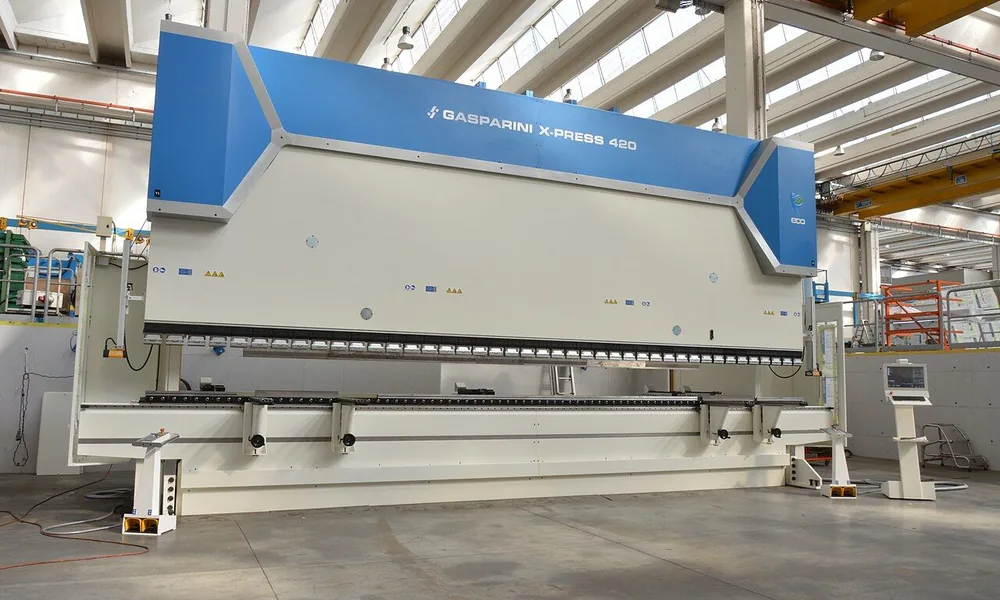
5. Amada VPSS 3i: The Best Tool for Press-Brake Programming and Bend Simulation
VPSS 3i is Amada’s offline programming system for press brakes, and it solves the most expensive problem in folding: finding out a bend is wrong after the part is already bent. The software simulates the whole bending job in three dimensions, showing the bend sequence, the tooling, the backgauge fingers and the part itself at every stage. If the part collides with the tooling, or the operator’s hands would be in the way, the problem shows up on screen, not on the shop floor.
That simulation changes how a new shop works. Instead of tying up the press brake for trial bends, the programmer builds and proves the job at a desk while the machine keeps running paid work. When the program reaches the brake, the operator loads the tooling the software chose, follows the sequence on the control, and bends the part. First-time-right bending is the difference between a folding station that makes money and one that makes scrap.
Machine the Parts That Cutting Cannot Finish
6. Mastercam: The Best Tool for CNC Milling and Turning
Mastercam is the machining software that takes over where cutting and folding stop. Not every part in a metal shop is a flat profile. Some need holes drilled at angles, pockets milled to depth, threads cut, or faces machined flat so they sit true against another part. Mastercam turns a three-dimensional model into toolpaths for milling machines and lathes, choosing the cutter, the speed, the depth of cut and the order of operations.
For an installation startup, Mastercam matters because it decides whether the shop can take on the higher-value work. Flat cutting is competitive and price-sensitive. Machined parts, especially one-offs and short runs for local industry, pay better and build longer relationships. A shop that can machine as well as cut and fold can say yes to a much wider range of jobs, from repair parts for farm machinery to brackets for local manufacturers.
Prove Every Part Measures Up
7. FARO Quantum Max ScanArm: The Best Tool for Measuring and Inspecting Finished Parts
The FARO Quantum Max ScanArm is a portable measuring arm that checks finished parts against their drawings, and it is the tool that lets a new shop prove its work instead of just claiming it. The operator moves the arm’s probe or laser scanner over the part, and the software compares every measured point with the model. Bends, hole positions, flatness and overall size are all checked in minutes, with a report the client can keep.
That proof is worth real money. Many of the best customers for a metal shop, from agricultural engineers to small manufacturers, need parts that fit first time and can show it. A shop that hands over an inspection report with the parts wins those customers from shops that only offer a promise. For an installation startup, setting up a small inspection area with a measuring arm tells the client that quality is part of the fit-out, not an afterthought.
Quote, Schedule and Run the Shop
8. Paperless Parts: The Best Tool for Fast, Accurate Quoting from Drawings
Paperless Parts is a quoting platform built for custom part manufacturers, and it attacks the problem that quietly kills new metal shops: slow quotes. A customer sends a drawing, and instead of the quote taking three days of manual measuring and maths, the software reads the drawing, works out the geometry, suggests the manufacturing steps, and builds a priced quote in minutes. The shop replies while the customer is still deciding, not after they have already asked a competitor.
The platform uses the part’s geometry to estimate cutting time, bending time, machining time and material cost, and it learns from the shop’s own history as more jobs pass through it. That learning matters, because a quote based on the shop’s real costs beats a quote based on guesswork every time. Jobs that look profitable on a guess often lose money, and jobs that look thin on a guess are often the ones worth winning.
For an installation startup, Paperless Parts is also a handover tool. It gives the new shop a professional quoting process on day one, with branded quotes, clear line items and a record of every enquiry. That professionalism wins work from customers who are used to dealing with established shops, and it gives the founder a clear view of which jobs make money and which ones do not.
9. ProShop ERP: The Best Tool for Running the Whole Shop Day to Day
ProShop ERP is the system that holds a metal shop together once the work starts arriving. It tracks every job from quote to delivery, schedules machines and people, manages material stock, records time on each job, and produces the invoices at the end. In a shop with ten jobs running at once, that single view is what stops jobs being forgotten, material running out, or invoices going out late.
The software is built for machine shops and fabricators, so it understands the way they actually work. A job is not just a line on a spreadsheet. It has drawings, revisions, materials, operations, inspections and deliveries, and ProShop keeps them all attached to the job. When a customer rings to ask where their parts are, the answer is on one screen instead of spread across a whiteboard, a notebook and three people’s memories.
ProShop also shows the founder which jobs make money. By recording the real time and material on each job against the quote, it builds a picture of the shop’s true margins. That picture is what lets a new business raise prices on the work that loses money, win more of the work that pays, and plan the next machine purchase with evidence instead of hope.
Building Your Metalworking Shop AI Stack
The nine tools above work best as a chain, not as nine separate purchases. The chain starts with SOLIDWORKS, where the part is designed and the flat pattern is made. The flat pattern flows into ProNest, TruTops Fab or BySoft for cutting, depending on the machine, then into VPSS 3i for bending, then into Mastercam where machining is needed. The FARO arm checks the finished part, Paperless Parts prices the next one, and ProShop keeps the whole flow organised.
Build that chain in the order the work travels, and buy each link when the work proves you need it. A sensible first stack for a new shop is design software, one cutting programmer, one bending programmer and a quoting tool. Add machining software when the first machining job arrives, add the measuring arm when a customer asks for inspection reports, and add the full management system when the whiteboard can no longer hold the week’s jobs. Each addition should follow a real bottleneck, not a catalogue.
Keep the finishing stage in the plan from the start, even though it is not the lead of this guide. A metal shop that cannot finish parts properly will send work elsewhere, and that work rarely comes back. Talk to specialists when the finishing room is specified, and read how a dedicated coating room is planned before you promise one to a client, because a spray booth installation startup builds a very different room from a general metal shop. The finishing room needs its own airflow, its own filtration and its own curing plan, and it should be costed as a separate line, not squeezed into the general fit-out budget.
What a Metalworking Shop Installation Startup Should Budget for AI Tools
Budget in three parts: software, training and time. The software itself ranges from a modest monthly subscription for quoting tools to a substantial one-off purchase with annual support for design and machining software. Some cutting and bending tools arrive with the machine, which hides their cost inside the machine price, but they still need setting up and learning. Add up the yearly cost of the whole stack and check it against the profit on the first year’s expected work, not against the startup’s hopes.
Training is the part most new founders under-budget. A tool that nobody can use properly is wasted money, and the cost is not just the course fee. It is the days the team spends learning instead of earning, and the weeks of slower work while new habits settle in. Budget a training day per tool per person, plus a week of supported practice on real jobs, and treat that time as part of the installation price, not as a favour the startup throws in for free.
Time is the third cost, and it is the one that catches people out. Setting up material libraries, tooling libraries, templates and defaults takes days of careful work, and it has to be done before the shop opens, not fitted in around live jobs. A startup that rushes the setup hands over a shop that works badly for a year. A startup that does the setup properly hands over a shop that runs smoothly from the first week, and that reputation is worth far more than the days saved by rushing.
Common Mistakes New Metalworking Shop Installation Startups Make With AI Tools
The first mistake is buying software before knowing the work. A founder who falls in love with a machining package before the shop has a single machining job ends up with an expensive tool gathering dust, while the cutting table that actually earns the money runs on guesswork. Let the first clients’ work decide the first purchases, and let each purchase earn the next one.
The second mistake is skipping the file handover. Tools that cannot share files cleanly force the team to redraw parts at every station, which wastes hours and introduces errors. Test the full chain with a real client drawing before the shop opens, from design through cutting and bending to inspection, and fix every broken handover while there is still time to fix it cheaply.
The third mistake is under-training. A two-hour demo is not training. The team needs to program, cut, fold and measure real parts with someone experienced watching, and to make their mistakes while the cost is low. Build supervised practice into the handover week, and leave behind worked examples using the client’s own parts, so the learning continues after the startup has gone.
The fourth mistake is forgetting the office side of the shop. Founders who spend every pound on machines and software often have no quoting process, no job tracking and no invoicing discipline, and the business quietly bleeds money while the machines run beautifully. Quoting and management tools are not luxuries. They are what turn a good workshop into a business that survives its first year.
Metalworking Shop Installation Startup Checklist
Use this checklist before the first client job runs through the new shop. Every item should be ticked off during handover, not discovered missing in the first week of trading.
- Map the part flow from goods-in to despatch, with cutting, folding, machining and finishing in order, and check that material never has to cross its own path.
- Prove the full software chain with a real client drawing, from the flat pattern in design software through cutting and bending programs to a measured finished part.
- Load the material and tooling libraries with the client’s real stock and real tooling, so programs match the shop that actually exists.
- Train the client’s team on their own parts, and leave behind worked examples for the most common jobs they will see in the first month.
- Set up quoting and job tracking before the first enquiry arrives, so no quote is ever lost and no job is ever forgotten.
- Agree the inspection standard for finished parts, and make sure the measuring tools and the reporting are ready before the first delivery leaves the shop.
Frequently Asked Questions
What is the best AI tool for a metalworking shop installation startup to buy first?
Start with design and nesting software, because they shape everything downstream. A clean flat pattern from SOLIDWORKS and a tight nest from a tool like ProNest save material and time on every job the shop ever runs. Bending simulation comes next, because a wrong fold is the fastest way to scrap a batch. Buy the rest of the stack as the work proves you need it.
How much should a metalworking shop installation startup spend on AI tools each month?
There is no single figure, because the stack depends on the machines in the shop and the work it takes on. As a rough guide, expect the first year’s software and training to cost about the same as one mid-range machine, with quoting and management tools on modest monthly subscriptions and design and machining tools as larger one-off purchases with annual support. Add up the yearly cost of the whole stack, check it against the profit on the first year’s expected work, and start smaller if the numbers do not work.
Can AI really plan a metalworking shop layout?
Yes, within limits. Design software can lay out machines, walkways and material flow in three dimensions, and nesting and bending software can prove that the planned machines can actually make the parts the client sells. What software cannot do is replace judgement about the business: which customers the shop will serve, which jobs it will turn away, and how fast it should grow. Use the tools to test the plan, and use experience to make the decisions.
Do metalworking shop installers need different AI tools from general workshop installers?
Yes. A general workshop installer fits out a flexible space for many trades, so its tools lean towards benches, storage and dust control. A metalworking shop installer plans a production flow for cutting, folding, machining and finishing, so its tools are nesting software, bending simulation, machining CAM and inspection equipment. The two trades share the idea of a good layout, but the software that runs the shop is different.
How do metalworking shop installation startups find their first customers?
Most first jobs come from local manufacturers, repair shops and fabricators who need a better shop but cannot plan one themselves. A strong first project, documented with photos and a clear story about what changed, is the best marketing the startup will ever have. Local trade contacts, machine suppliers and a simple website showing finished shops bring the second and third jobs, and the reputation for a shop that works from day one brings the rest.
What should a metalworking shop installation startup charge for a fit-out?
Price the project in parts: design and layout, machine supply or sourcing, installation and levelling, software setup and training, and the finishing room if one is included. Quote each part separately so the client can see where the money goes, and charge for the software setup and training as real work, because it is. A fit-out priced only on machines will always look cheaper than it is, and the startup will end up giving away its most valuable work for free.
Bottom Line
A metalworking shop installation startup succeeds when it treats the shop as one flow, from the first drawing to the last measured part. Cutting, folding, machining and finishing each need their own tools, and the tools in this guide cover that flow in order: SOLIDWORKS for design, ProNest, TruTops Fab and BySoft for cutting, VPSS 3i for folding, Mastercam for machining, the FARO arm for inspection, and Paperless Parts and ProShop ERP for quoting and running the business. Buy them in the order the work demands, set up the file chain properly, train the team on real parts, and the shop you hand over will earn its keep from the first week.

Keep what speaks to you.
Leave room for your own perspective.