A watermill installation startup builds a working watermill from open ground. The job starts with a stream, a fall of water and a customer who wants that water to do useful work, and it ends with a wheel turning and a pair of millstones grinding. Between those two points sits a chain of parts that all have to agree: the leat or mill race that carries water to the wheel, the millpond that stores it, the wheel itself, the axle and gearing that carry the power indoors, and the grinding gear that does the work. If any link is wrong, the wheel turns slowly, the stones glaze, or the pond empties faster than the stream can fill it.
That chain is what makes this trade different from the other mill work a founder might confuse it with. Turning a historic mill building into a home is a conversion job, and it belongs to a different kind of firm altogether. A watermill installation startup does not convert old mills. It builds new working ones, on sites where no mill has stood before or where only a ruined wheel pit remains, and it is judged on whether the finished mill grinds, not on whether the finished building looks good in photographs. The software in this guide is chosen for that job: measuring water, shaping ground, sizing wheels and keeping a small crew paid.
The tools below cover the whole build in the order a real job runs: flow and mapping first, then earthworks and wheel design, then the survey, and finally the quoting and invoicing that keep the business alive between jobs. Buy in that order and you spend money on answers before spending it on steel and timber.
Key takeaways
- A watermill installation startup builds a working watermill, wheel, race, millpond and grinding gear, from open ground. It is not a conversion trade.
- Measure the water before anything else. Flow, fall and pond storage decide the wheel size, the power output and whether the site is worth quoting at all.
- Free tools cover the first decisions: HEC-RAS models the flow and QGIS maps the catchment and the leat line at no licence cost.
- The wheel, axle and gearing deserve proper CAD time. A wheel that is a few centimetres out of true will shake itself loose within a season.
- Keep the business tools as simple as the build tools are technical. One quoting system, one invoicing system and one booking link are enough for the first year.

What a watermill installation startup actually builds
A finished watermill has five parts, and a startup has to build and guarantee all five. The leat, also called the mill race, carries water from the stream to the wheel. The millpond stores water so the mill can run steadily when the stream is low. The wheel turns water into motion. The axle and gearing, pit wheel, wallower and great spur wheel, carry that motion inside and step it up to millstone speed. And the grinding gear, millstones, hopper, shoe and tun, turns grain into flour. A startup that can only build three of the five will spend its first year subcontracting the rest and watching its margin leave with the subcontractor.
The water comes first because it sets every other decision. A site needs two numbers: flow, how much water passes in a second, and head, how far that water falls. Multiply the two and you have the power available, and that decides the wheel. A low fall with a generous flow suits a broad undershot or breastshot wheel, while a good fall with a modest flow suits an overshot wheel, fed from above. A founder who quotes a wheel before measuring flow and head is guessing, and the customer pays for the guess when the mill grinds half as fast as promised.
That measurement habit is also what separates this trade from its neighbours. A firm that specialises in turning a historic mill building into a home works with listed buildings, planning consent and interiors, and its software is built around heritage surveys and room layouts. A watermill installation startup works with rivers, levels and moving machinery, and its software has to understand water. The two trades share a vocabulary, wheel pits and mill races appear in both, but they sell different things, and a founder who mixes them up will quote the wrong job. Likewise a windmill installation is a different machine on a different site: wind, not water, and a tower, not a pond. The tools that site a windmill have nothing to say about a millpond.
The ground matters as much as the water. A leat is a channel graded to fall gently over hundreds of metres, and a millpond is an excavation with a dam, a spillway and a sluice. Get the levels wrong by a few centimetres and the water either never arrives or arrives too fast and overtops the bank. That is why this guide leans on survey and earthworks software: the digging is the expensive part of the job, and a level error found on screen costs nothing while the same error found with an excavator on site costs a week.
The 9 best AI tools for watermill installation startups
The nine tools below are the working set for a small watermill crew in 2026. Two are free, which keeps the first-year software bill low, and the rest earn their keep on the first or second job. Each one covers a different part of the build, from the first flow reading to the final invoice, and none duplicates another. The table gives the short version, and the sections that follow explain what each tool does on a real watermill job and where it can catch a founder out.
| Tool | Best for | Pricing |
|---|---|---|
| HEC-RAS | Modelling flow in the leat and levels in the millpond | Free |
| QGIS | Mapping the catchment and routing the leat line | Free |
| Autodesk Civil 3D | Grading the leat and designing the millpond earthworks | From $2,985 per year |
| SimScale | Simulating water flow over the wheel | Free tier; paid plans from $33 per month |
| Pix4Dmapper | Drone survey of the mill site and race line | From $353 per month |
| Fusion 360 | Designing the wheel, axle, gearing and millstones | From $85 per month |
| Jobber | Quoting, scheduling and tracking watermill jobs | From $49 per month |
| FreshBooks | Invoicing and cash flow for a small mill crew | From $21 per month |
| Calendly | Booking site surveys and mill inspections | Free tier; paid plans from $10 per month |
1. HEC-RAS: the best flow modelling for the leat and millpond
HEC-RAS is the free river modelling software from the US Army Corps of Engineers, and it is the most useful free tool a watermill startup will ever download. It models how water moves through a channel, which is exactly the question a leat asks. Feed it a surveyed cross-section of the stream and the proposed leat, add the flow figures from your gauging, and it will show water levels, velocities and depths along the whole line. That tells a founder whether the leat will carry enough water to the wheel in a dry August, and whether it will overtop its banks in a wet February.
The millpond is the second job HEC-RAS does well. A pond’s value is measured in hours of milling, not litres. Model the pond with its sluice and spillway and the software will show how long the mill can run from a full pond when the stream is low, and how fast it refills overnight. That number is the honest answer to how much grinding a day the mill will do, and a founder who can show it wins work from customers who have already been promised the moon.
HEC-RAS is not a beginner tool. The interface is plain and a first model takes a weekend of patience, but the price is nothing, the manuals are thorough, and the skill transfers to every later job. Run the model before the first site meeting and walk onto the site already knowing whether the numbers work.
2. QGIS: the best mapping for the catchment and leat route
QGIS is the free, open-source mapping system that does the geography of a watermill job. Every mill starts with a catchment, the area of land that drains into the stream, and QGIS turns elevation data into a catchment boundary, a stream network and a flow estimate in an afternoon. That is the first check on a new enquiry: is the catchment big enough, and does the ground fall the right way, for a mill to work here at all? A no at this stage saves a wasted site visit and a wasted quote.
The second job is the leat route. A leat has to fall gently and steadily, usually a few centimetres every ten metres, and it has to cross whatever the ground puts in the way. Draw the route on a QGIS elevation model and the software will profile it, showing every rise, dip and crossing before anyone walks the line. It will also show the alternatives, because a leat that swings around a wet hollow is cheaper than a leat that cuts through one. Print that map for the customer and the quote stops being a guess and starts being a plan they can see.
QGIS also keeps the records a mill job accumulates, catchment, leat line, pond outline and access track, on one map every later tool can read. Professional mapping software costs thousands a year. QGIS costs nothing, and on a watermill job it does the same work.
3. Autodesk Civil 3D: the best earthworks design for the leat and millpond
Autodesk Civil 3D is the civil engineering design tool that turns a surveyed site into a buildable set of levels. Where QGIS sketches the route, Civil 3D engineers it. It builds a surface from the survey, grades the leat to its design fall, shapes the millpond excavation and the dam, and calculates the cut and fill volumes, how much earth moves and where it goes. Those volumes are the earthworks quote, and on a mill job the earthworks are often the largest single cost, so getting them right is the difference between a profitable job and a loss.
The tool earns its keep on the details that catch founders out. A leat that crosses a track needs a culvert, and Civil 3D will size the pipe and set its levels. A millpond needs a spillway that can pass a flood without washing the dam away, and the software will model the spillway and the downstream channel. A site with poor access needs a track that an excavator and a low loader can actually use, and the grading tools will show whether the gradients work. Each of these is a small design decision that is cheap on screen and expensive in the field.
Civil 3D is the most expensive tool in this guide, from $2,985 per year, so do not buy it on day one. Use HEC-RAS and QGIS for the first quotes, then add Civil 3D when the first paid design job lands and the licence can be charged to it. What matters is that the earthworks are designed, not guessed, before the digger arrives.
4. SimScale: the best flow simulation for the waterwheel
SimScale is cloud-based engineering simulation, and on a watermill job it answers the question every customer asks: will the wheel actually turn properly? A waterwheel is a piece of fluid engineering. Water strikes the floats, fills the buckets or pushes the blades, and the shape of the wheel, the depth of the buckets and the speed of the water all decide how much power comes out. SimScale lets a founder model that flow on screen, test an overshot wheel against a breastshot wheel on the same site, and see where the water spills, stalls or misses the wheel altogether.
The practical value is in the wheel choice. Overshot, breastshot and undershot wheels behave very differently on the same stream, and the wrong choice can halve the power. A simulation shows the difference in numbers before any timber is cut, so the quote can promise a wheel that fits the site. It also shows the wear points, where fast water scours the wheel pit or tailrace, so the design can include stone or concrete protection from the start.
SimScale runs in a browser, so it needs no powerful workstation, and there is a free community tier for small models. Paid plans start from $33 per month. Expect the first model to take a few evenings, and that time pays back on the first wheel sized right the first time, because a rebuilt wheel is the most expensive mistake in this trade.
5. Pix4Dmapper: the best drone survey for the mill site
Pix4Dmapper turns drone photographs into a surveyed map of the mill site. Fly the site, feed the photographs into the software, and it builds an orthomosaic, a flat, accurate aerial photograph, and a 3D surface model showing every bank, hollow and tree line. For a watermill job, that surface is the basis of everything that follows: the leat levels, the pond excavation and the access route all start from it. It is faster than a ground survey on rough riverside land, and it shows the whole site at once, which a ground survey never does.
The drone survey is also the tool that keeps the build honest. Fly the site before the dig and again at each stage, and the models show exactly how much ground has moved, whether the leat is on its designed line, and whether the pond is taking the shape it should. That record settles arguments before they start, with the customer, with the landowner and with the excavator operator. On a job where the ground is the product, a dated, accurate record of the ground is worth more than any written report.
Pix4Dmapper costs from $353 per month, so many startups hire a licensed drone operator for the first surveys and buy the software later, once the survey work is regular. Either way, the survey itself is not optional. A watermill built on guessed levels is a watermill that does not work, and the drone is the cheapest way to stop guessing.
6. Fusion 360: the best CAD for the wheel, axle and gearing
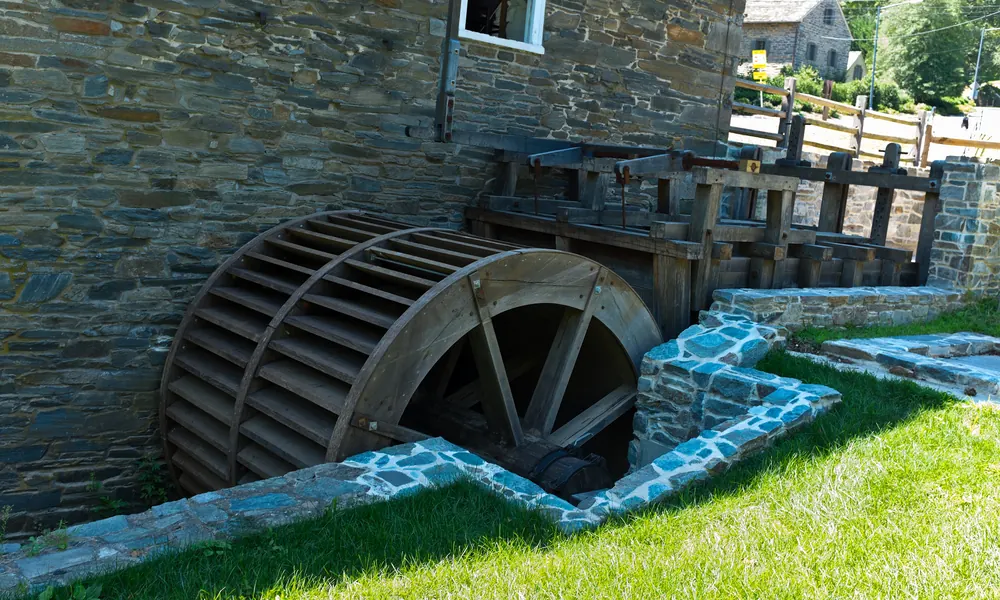
Fusion 360 is the design tool for the machine inside the mill. The wheel, the axle, the pit wheel, the wallower, the great spur wheel and the millstone assembly are a single mechanical system, and they have to be designed as one. Fusion 360 models them together, so a change to the wheel diameter updates the gearing, the axle loads and the stone speed in the same model. That matters because the parts are cut by different people, often in different workshops, and they all have to meet on site and fit first time.
The grinding gear deserves the most attention. A pair of millstones has to run true, with a gap between the stones measured in fractions of a millimetre, and the tun, hopper and shoe that feed grain into the stones have to match the stone speed. Model the whole assembly and the software will show where the grain flow jams, where the stones would rub, and where a guard is needed before a hand can reach the moving parts. A mill that grinds well and a mill that is safe to stand beside are the same design problem, and CAD is where both get solved.
Fusion 360 costs from $85 per month, and for a watermill startup it is the best-spent subscription in this guide after the free tools. It produces the drawings the workshops need, the cutting lists the timber merchant needs, and the renders the customer needs to see before they commit. A founder who can show a customer their own wheel turning on screen closes quotes that a paper sketch never would.
7. Jobber: the best job system for quoting and scheduling mill work
Jobber is the field-service system that runs the business side of a watermill startup. A mill job is long, often six to twelve weeks from first survey to handover, and it has many visits: survey, design sign-off, groundworks, wheel installation, gearing, grinding trials and handover. Jobber holds all of those visits against one job, with the quote, the photos, the notes and the costs attached. Nothing gets lost between the riverbank and the office, and the founder can see at a glance which jobs are surveyed, which are quoted and which are waiting on a part.
The quoting is where Jobber earns its fee. A watermill quote has many lines, survey, modelling, earthworks, wheel, gearing, stones, electrics and commissioning, and a customer who sees a clear, itemised quote trusts it more than a single round number. Jobber builds that quote from the site notes, sends it by email or text, and tracks whether it has been opened and approved. Once approved, the quote becomes the job, and the schedule, crew and materials follow without retyping.
Jobber costs from $49 per month, and it replaces the spreadsheet, the diary and the pile of paper quotes that sink most new trades. Log every cost against its job, every hour and every bag of cement, because a mill startup that does not know its true job cost will quote the next mill at the same losing price.
8. FreshBooks: the best invoicing and cash flow for a small mill crew
FreshBooks is the invoicing and accounting tool for the money side of the startup. Mill jobs are paid in stages, a deposit on order, a payment when the groundworks finish, a payment when the wheel turns, and a final payment at handover, and FreshBooks handles that rhythm well. It sends the stage invoices, chases the late ones automatically, and shows which jobs have paid and which are still owed. A small crew lives or dies on that picture, because the timber merchant and the stone dresser both want paying before the final invoice clears.
The tool is deliberately simple, and that is its strength. It does not try to be a full accounting system. It records income and expenses, tracks time against jobs, and produces the reports an accountant needs at year end. A founder who hates bookkeeping will actually use it, and a tool that gets used beats a powerful tool that sits untouched. Connect it to the business bank account and the expenses sort themselves, which leaves the evenings free for designing wheels instead of typing receipts.
FreshBooks costs from $21 per month, the cheapest paid subscription in this guide. Invoice the moment a stage is complete, not at the end of the week, because a mill job ties up thousands in materials and a week’s delay in invoicing is a week’s delay in cash. FreshBooks makes same-day invoicing a two-minute job from the site.
9. Calendly: the best booking for site surveys and mill inspections
Calendly is the scheduling link that stops the email tennis around site visits. A watermill enquiry usually needs a site survey before it can be quoted, and that survey needs the customer, the founder and often the landowner in the same field at the same time. A Calendly link shows the founder’s real availability, lets the customer pick a slot, and sends reminders to everyone. The survey happens, the quote follows, and no one spends an afternoon chasing a reply.
The tool also handles the visits after the build. A new mill needs a first service, a few months after handover, to check the wheel bearings, gearing and stones, and Calendly books it without a phone call. It books the grinding trials too, when the customer brings their own grain to test the mill, and the follow-up inspections that turn a one-off installation into a maintenance customer.
Calendly has a free tier that covers a single booking link, and paid plans start from $10 per month. For a startup, the free tier is enough for the first year. Every enquiry gets a booking link within the first reply, every survey gets a reminder, and every finished mill gets a service date in the diary before the founder leaves the site.
How the tools fit together on one job
A typical job runs in the same order as this guide. The enquiry arrives, and QGIS checks the catchment while HEC-RAS checks the flow, before the founder drives to the site. The drone flies the site and Pix4Dmapper builds the surface. Civil 3D grades the leat and shapes the pond, SimScale tests the wheel, and Fusion 360 designs the gearing and grinding assembly. Jobber turns the design into a quote, Calendly books the dates, and FreshBooks invoices each stage as it completes.
The grinding gear is where the tools meet the customer’s real purpose, which is usually flour. The stones, the feed and the dress decide the quality of the flour, and a mill that grinds poorly will not be forgiven because the wheel is beautiful. That is the same judgement that runs through grain silo installation, where the storage and handling of grain decide whether the harvest keeps its value. A founder who understands the whole chain, from stream to sack of flour, quotes mills that work and keeps customers who recommend them.
What a first-year toolkit costs
Add the subscriptions together and the first year looks like this. HEC-RAS and QGIS cost nothing, and Calendly costs nothing on the free tier. FreshBooks costs about $250 a year, Jobber about $590, Fusion 360 about $1,020 and SimScale about $400 on a paid plan, roughly $2,260 a year for the working set. Civil 3D adds about $2,985 a year and Pix4Dmapper about $4,240 a year at monthly rates, so a fully equipped firm spends around $9,500 a year on software.
Buy in the order the jobs demand. Start with the free tools and FreshBooks, add Jobber and Fusion 360 with the first paid design, and add SimScale, Civil 3D and Pix4Dmapper when the wheel proving, earthworks and survey work become regular. A startup that buys everything on day one spends its deposit before it earns it.
Pre-install checklist
- Gauge the stream at low water and record flow and head before quoting a wheel size or a price.
- Model the leat and the millpond, and confirm the pond holds enough water for a full day of milling.
- Survey the site by drone, and set out the leat line, pond outline and access track from the survey, not from memory.
- Design the wheel, axle and gearing as one model, and check the millstone speed and gap before ordering materials.
- Agree the stage payments in writing, with a payment at groundworks, at first turning and at handover.
- Book the first service visit before leaving the site, and leave the customer with the sluice and stone-dressing routine in writing.
Frequently asked questions
What is the best AI tool for a watermill installation startup?
Start with HEC-RAS and QGIS, because both are free and both answer the question that decides everything: does this site have enough water, falling far enough, to run a mill? Add Fusion 360 for the wheel and gearing design and Jobber for quoting and scheduling once the first paid job lands. No single tool covers the whole build, and a founder who buys one expensive system expecting it to do everything will be disappointed.
How much should a watermill installation startup budget for AI tools each month?
About $190 a month covers FreshBooks, Jobber, Fusion 360 and SimScale, with HEC-RAS, QGIS and Calendly free. Civil 3D and Pix4Dmapper add roughly $600 a month between them, so hold those until the earthworks and survey work are regular. Budget the software as a cost of each job, not as overhead.
Can AI tools really design a waterwheel?
They can model it, and that is the useful part. SimScale shows how water flows over a wheel and where it spills or stalls, and Fusion 360 models the wheel, axle and gearing as one system. Neither replaces the millwright’s judgement about timber, bearings and wear, but both stop the expensive errors, the wrong wheel type and the gearing that does not fit, before any material is ordered.
Do I need a drone to run a watermill installation startup?
Not on day one. Hire a licensed drone operator for the first surveys and use the Pix4Dmapper models they supply. Buy the drone and the software once the survey work is regular enough to pay for them, which for most founders is after the third or fourth job. What is not optional is an accurate survey, by drone or by ground levels, because a mill built on guessed levels does not work.
How long does a watermill installation take?
A small watermill, wheel, race, pond and grinding gear, usually takes eight to fourteen weeks from the first survey to handover, with the groundworks taking the longest. Dry weather helps, because a leat and a pond cannot be dug well in a flooded field. The grinding trials and handover take a further week, and the first service follows a few months later.
What should I do first in the month before the build starts?
Measure the water, model the leat and pond, and get the design signed off by the customer in writing. Order the long-lead items, the wheel timber, the axle and the millstones, because those set the schedule. Confirm the stage payments, book the excavator and the crew, and set the survey and installation dates. A month of preparation saves a month of rework.
The bottom line
A watermill installation startup is a water business before it is a building business, and its tools should show it. Measure the flow and the fall first, model the leat and the pond, survey the ground properly, and design the wheel and gearing as one machine. The free tools do the first half of that work and the paid tools do the second, and together they cost less than a single week of rework on a riverside site. Build the mill the water can actually run, quote it honestly, invoice each stage on time, and the second mill will come from the customer the first mill made happy.

Keep what speaks to you.
Leave room for your own perspective.