
The best AI tools for insurance adjusters in 2026 do one thing well: they turn a slow, paper-heavy claims process into a faster, clearer, and more consistent one. Instead of spending hours retyping notes, measuring damage by hand, and chasing missing photos, adjusters can now capture a loss, analyse the damage, draft a report, and move a claim toward settlement in a fraction of the time it used to take.
That speed matters because claims work has always been a race against volume. After a storm, a burst pipe, or a vehicle collision, dozens of files can land on one desk at the same time. The adjusters who close files well are not the ones who rush; they are the ones who spend their time on judgement, on talking to policyholders, and on checking the details that actually change a settlement. The best AI tools for insurance adjusters take the repetitive work off that desk so the human work gets the attention it deserves.
This guide compares the strongest options for 2026 across the whole claims journey, from first notice of loss and inspection to estimating, reporting, and settlement. It explains what each type of tool does, who it suits, what it costs in practical terms, and where its limits are. Every tool here is judged on the same questions an adjuster asks on a real file: does it save time, does it improve accuracy, does it fit the way claims are actually worked, and does it keep the adjuster in control of the final decision?
Key takeaways
- The best AI tools for insurance adjusters in 2026 cover inspection, estimating, document reading, report drafting, and settlement support, not just one step of the claim.
- Photo-based damage detection and automated estimating save the most time on property claims, especially roof, water, and storm losses.
- Choose tools that export clean data into your existing claims system, because a clever tool that traps information in its own app creates more work than it saves.
- AI should draft, measure, and flag; the adjuster should verify, decide, and communicate, because accuracy and fairness still depend on human judgement.
- Start with one tool for your most common claim type, measure the time saved over a month, and only then add a second tool.
How AI Is Changing Claims Work in 2026
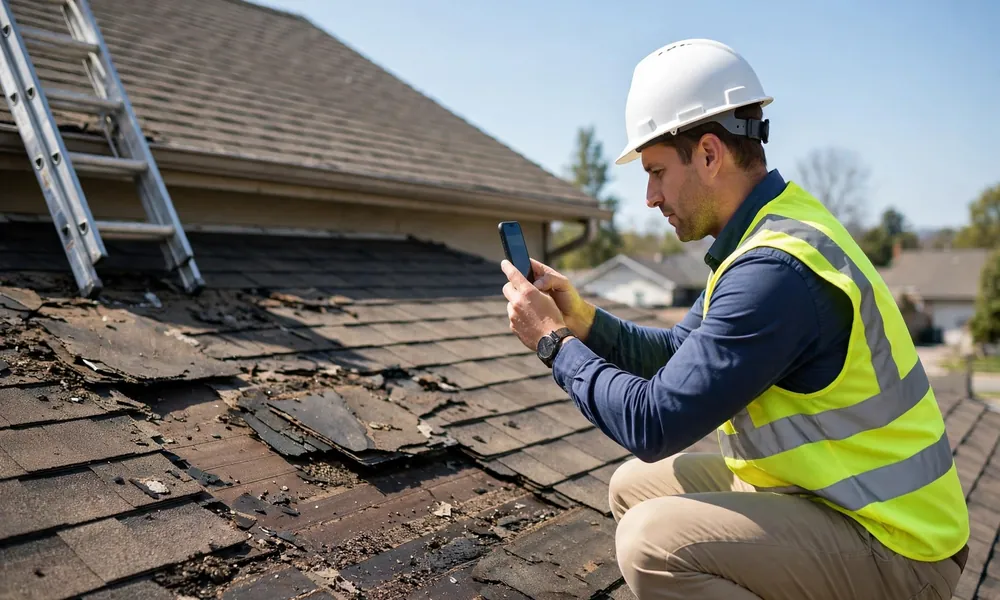
Claims adjusting used to follow a fixed sequence: visit the property, take photos, take notes, return to the office, write the report, build the estimate, and send it for review. Each step depended on the one before it, so a delay at the inspection stage pushed everything else back. In 2026, AI tools compress that sequence by working on several steps at once. Photos taken on site can be analysed while the adjuster is still at the property, and a draft estimate can be ready before the adjuster has left the driveway.
The change is most visible on property claims. A roof inspection that once needed a ladder, a tape measure, and a long afternoon of sketching can now start with aerial imagery and a set of smartphone photos. The software measures roof planes, counts slopes, and flags damaged areas, and the adjuster checks the results against what was seen on site. Water claims work in a similar way: moisture readings, photos of affected rooms, and a list of damaged materials can be turned into a structured scope of work without retyping the same room dimensions three times.
What to Look for in an AI Tool for Adjusters
The first thing to check is fit with your claim mix. An adjuster who works mainly on residential property claims needs strong photo measurement and estimating, while an adjuster who handles motor claims needs vehicle damage recognition and parts pricing. A tool built for one type of claim will feel clumsy on another, so start by listing the three claim types you handle most often and judge every tool against that list. A general tool that does a little of everything is rarely as useful as a focused tool that does your main work well.
Accuracy comes next, and it is harder to judge from a sales page than it looks. Ask for a trial on real files, not a polished demonstration. Run five or ten closed claims through the tool and compare its output with the settled figures. Look at where it was close, where it missed damage, and where it added items that were not there. A tool that is right most of the time but wrong in the same way every time is easier to manage than a tool that is sometimes brilliant and sometimes far off, because you can learn to check its weak spots.
Integration matters more than most adjusters expect. A tool that exports estimates, photos, and notes cleanly into your claims management system will save hours every week. A tool that keeps everything inside its own app will cost hours, because someone has to copy figures across by hand. Before buying, ask exactly how data leaves the tool, what formats it supports, and whether the export keeps photos linked to the right rooms, items, and line entries. If the answer is vague, treat that as a warning.
Finally, check how the tool handles evidence and privacy. Claims files contain personal details, photos of people’s homes, and financial information. A serious tool should explain where data is stored, who can see it, how long it is kept, and how it can be deleted. It should also keep a clear record of what the AI suggested and what the adjuster changed, because that record protects both the adjuster and the policyholder if a settlement is questioned later. Adjusters who also work alongside brokers will find that the best AI tools for insurance brokers share many of these same evidence and privacy requirements, which makes it easier to agree on a common way of working.
Best AI Tools for Insurance Adjusters at a Glance
The table below gives a quick comparison of the leading options for 2026. It is a starting point, not a verdict: the right choice depends on your claim mix, your budget, and the systems you already use. Read the detailed reviews that follow before making a shortlist, and trial at least two tools on real files before committing.
| Tool type | Best for | Standout strength | Main limitation |
|---|---|---|---|
| AI photo estimating | Property and motor damage | Fast first estimates from photos | Needs clear, well-lit images |
| Aerial roof measurement | Roof and storm claims | Accurate measurements without a ladder | Less useful on complex roofs |
| Document extraction | Long files and invoices | Finds key facts in minutes | Needs human checking on figures |
| Claims triage | High-volume intake | Sorts urgent files first | Depends on clean intake data |
| Voice-to-report | Field adjusters | Turns spoken notes into drafts | Struggles with background noise |
| Drone imagery analysis | Large or unsafe properties | Safe views of hard-to-reach damage | Needs flight permissions and skill |
| Fraud-pattern flagging | Review teams | Spots unusual patterns early | Flags need careful human review |
| Settlement analytics | Negotiation and reserving | Compares similar settled claims | Only as good as its data set |
| Customer messaging | Policyholder updates | Clear, fast status messages | Must stay personal and accurate |
| Workflow automation | Busy adjusting teams | Removes repetitive admin steps | Needs setup time to pay off |
The Best AI Tools for Insurance Adjusters in 2026
The tools below are grouped by the job they do best. Some adjusters will need only one or two of them; a busy team handling many claim types may use four or five together. In every case, the value comes from how the tool fits into a real working day, not from how many features it lists on its website.
1. AI Photo Estimating for Property Damage
AI photo estimating is the single biggest time saver for most property adjusters. The adjuster photographs each damaged area, and the software identifies the materials, measures the affected surfaces, and builds a draft scope of work. A water-damaged kitchen, for example, can be scoped room by room from a set of photos, with flooring, drywall, cabinets, and trim listed as separate line items. The adjuster then checks each line, removes anything that is not damaged, and adds anything the photos missed.
The strength of these tools is consistency. Two adjusters photographing the same room will produce similar scopes, which reduces arguments at review and makes reserves more predictable. The weakness is image quality: dark, blurry, or incomplete photos produce weak estimates, so the habit of taking clear, overlapping photos from several angles matters more than ever. Adjusters who train themselves to photograph a room in a fixed pattern, corner to corner, get far better results than those who take a handful of random shots.
2. Aerial Roof Measurement and Damage Detection
Roof claims are slow, physical, and sometimes risky, which is why aerial measurement tools have become a standard part of the adjuster’s kit. Using satellite or aerial imagery, the software draws the roof outline, measures each plane, calculates the slope, and estimates the materials needed for repair or replacement. The adjuster can then compare those measurements with photos taken on site and with the contractor’s own figures.
Damage detection adds a second layer. Some tools can highlight areas where shingles look lifted, cracked, or missing, and can count the damaged areas across a roof. This does not replace a physical inspection when one is needed, but it does help the adjuster decide where to look first and whether a full roof replacement is likely or a repair will do. On a large or steep roof, that guidance saves time and reduces the need to walk every slope.
3. AI Document Extraction and File Summaries
Long files are where many claims slow down. A single claim can include a policy document, a contractor’s estimate, a plumber’s invoice, a set of medical notes, and several pages of correspondence. AI document tools read those pages, pull out the names, dates, amounts, and key statements, and present them in a short summary with links back to the source pages. The adjuster can then check the summary against the originals and focus on the pages that matter.
The practical benefit is easy to measure: a file that took an hour to read can often be understood in fifteen minutes. The risk is over-trust. If a summary misses a small exclusion in a policy or misreads a figure on an invoice, the error can travel into the settlement. Good adjusters treat every AI summary as a draft, check the figures that change money, and read the full text of any clause that affects cover. The tool is a reading aid, not a replacement for reading.
4. Claims Triage and First Notice of Loss
After a major storm, the first problem is not estimating; it is deciding which claims to work first. Triage tools sort incoming claims by urgency, complexity, and likely value, so that a family without a roof gets attention before a minor fence repair. They do this by reading the first notice of loss, the photos attached to it, and any earlier claim history, and then ranking the files for the team.
Good triage also spots the files that need a specialist. A claim that mentions structural damage, a large water loss, or a vulnerable policyholder can be routed to a senior adjuster straight away, instead of waiting in a general queue. That early routing shortens the time to first contact, and early contact is one of the strongest predictors of a smooth claim. Policyholders who hear from an adjuster quickly are more patient, more cooperative, and more likely to provide the documents needed.
5. Voice-to-Report Tools for Field Adjusters
Field adjusters spend much of their day talking: talking to policyholders, talking to contractors, and talking through what they see. Voice-to-report tools turn that spoken work into written notes. The adjuster speaks a short description of each room or each damaged item, and the software turns the speech into structured text that can be dropped into a report. A ten-minute walk-through can produce a solid first draft of the inspection notes.
The best tools understand claims language. They recognise terms for materials, rooms, and damage types, and they organise the notes by location rather than leaving one long block of text. Some can also pull out action items, such as documents to request or measurements to confirm, and list them separately. That small feature saves a surprising amount of time, because the adjuster does not have to re-read the whole report to find what is still missing.
6. Drone Imagery and Remote Inspection Tools
Some properties are hard or unsafe to inspect on foot: a steep roof after a storm, a large commercial building, a flooded area, or a property with damaged structures. Drone imagery tools let an adjuster capture high-resolution photos and video from a safe distance, and AI analysis can then measure areas, highlight damage, and build a map of the loss. The result is a clear record of the damage without putting anyone at risk.
Drones also help on large losses where a ground-level view misses the scale of the damage. A single overhead image can show the full extent of a roof loss or a damaged outbuilding in a way that twenty ground photos cannot. That overview helps the adjuster explain the claim to a reviewer and helps the policyholder understand what was found. When the images are stored with the claim file, they also protect everyone if the damage is questioned months later.
7. Fraud-Pattern Flagging and Anomaly Detection
Most claims are honest, but a small number contain errors, exaggerations, or deliberate misrepresentation. Fraud-pattern tools look for unusual signals across many claims: the same photos used on different files, repair costs far above the local range, a sudden change in the story, or a pattern of claims from the same address. The tool does not accuse anyone; it flags files for a closer look by a human reviewer.
8. Settlement Analytics and Comparable Claims
One of the hardest parts of adjusting is knowing whether a settlement figure is fair. Settlement analytics tools compare a claim with similar settled claims, taking account of the loss type, the location, the property, and the scope of damage. The adjuster can see the range of outcomes for comparable files and use that range as a check on the proposed settlement. If a figure sits far outside the usual range, the tool prompts a second look at the scope or the pricing.
9. AI Messaging and Policyholder Updates
Policyholders judge a claim as much by communication as by money. A claim that is handled well but explained badly will feel slow and unfair, while a claim that is explained clearly will feel fair even if it takes time. AI messaging tools help adjusters send timely, clear updates: what has happened, what happens next, what is needed, and when the next update will arrive. The adjuster writes the key facts, and the tool drafts a clean message in a polite, consistent tone.
10. Workflow Automation for Adjusting Teams
Workflow automation is the least visible tool on this list and often the most valuable for a busy team. It handles the small steps that fill a working day: assigning a new claim to the right adjuster, sending a standard acknowledgement, chasing a missing document, booking a diary reminder, and moving a file to review when the estimate is complete. Each step is small, but together they add up to hours every week.
Automation needs careful setup. A workflow that sends the wrong message or assigns a file to the wrong person will cause more work than it saves, so teams should start with one or two simple steps, test them for a month, and only then add more. The goal is not to automate everything; it is to automate the steps that are always the same, so that adjusters can spend their time on the steps that are always different. Property specialists will notice a similar pattern in the best AI tools for property managers, where routine inspections and maintenance requests are automated in much the same way.
How to Use AI Tools on a Real Claim
A tool only helps if it fits into the order of a real claim, so it helps to picture a typical property file from start to finish. The claim arrives with a short description and a few photos. The triage tool ranks it, the adjuster makes first contact, and an inspection is booked. On site, the adjuster takes a planned set of photos, speaks the inspection notes, and lets the estimating tool build a first draft. Back in the office, the document tool summarises the contractor’s invoice, the adjuster checks the figures, and the report is drafted. The settlement tool then compares the result with similar claims, and the messaging tool sends a clear update to the policyholder.
Estimating is where the adjuster’s judgement shows most clearly. An AI estimate is a starting point, and the adjuster’s job is to make it true to the property in front of them. Remove items that are not damaged, add items the photos missed, and check the quantities against the measurements taken on site. Pay special attention to items that are easy to miss: the flooring under a damaged cabinet, the insulation behind a wet wall, or the flashing around a roof repair. Those hidden items are where an estimate most often goes wrong, and no photo tool can see them all.
Inspection skills transfer across property work, which is why adjusters often learn from related fields. The best AI tools for home inspectors cover many of the same photo, measurement, and reporting habits, and an adjuster who adopts those habits will find that AI estimates become more accurate with every claim.
Pricing and Value: What Adjusters Actually Pay
Pricing for AI claims tools varies widely, and the headline price rarely tells the whole story. Some tools charge per claim, some charge per user each month, and some charge a larger annual fee for a team. A per-claim price can look cheap for a light month and expensive after a storm, while a monthly subscription can look expensive in a quiet month and cheap in a busy one. The fair way to compare them is to work out the cost per closed claim over three months, including the time saved on each file.
As a rough guide, a single focused tool for one adjuster often costs about the same as a few hours of working time each month, while a full claims platform for a team can cost several times that amount. The question is not whether the tool is cheap; it is whether it saves more time than it costs. An adjuster who saves an hour on each of twenty claims a month has saved far more than the price of most single tools. A team that saves half an hour on each of two hundred claims has saved far more than the price of a platform.
Common Mistakes to Avoid
The most common mistake is trusting the first output too much. AI tools are confident by design: they present a neat estimate, a clean summary, and a tidy report, and it is easy to accept them without checking. The adjusters who get the best results treat every AI output as a draft that needs a human check, especially on figures, dates, and policy details. A five-minute check at the end of each file catches most errors, and the habit of checking becomes faster with practice.
The second mistake is buying too many tools at once. A new tool takes time to learn, and two new tools take far more than twice as long, because the adjuster has to learn how they work together as well as how each one works alone. Teams that succeed start with one tool, use it for a month, and only then add a second. That slow start feels cautious, but it produces a set of tools that actually get used, rather than a shelf of subscriptions that no one opens.
The third mistake is poor photos. No estimating tool can work from dark, blurry, or incomplete images, and no amount of software can recover damage that was never photographed. The fix is a simple routine: clean the lens, turn on the light, take wide shots before close shots, and check the photos before leaving the property. That routine takes two minutes and improves every tool that uses the photos.
A Simple Checklist Before You Buy
Use this checklist when you trial any AI tool for adjusting work. If a tool fails on one of these points, think carefully before committing to it, however good its other features look.
- Trial it on at least ten real, closed claims and compare its output with the settled figures before you pay.
- Confirm that photos, estimates, and notes export cleanly into your existing claims system without manual retyping.
- Test it on site in poor light, with a weak signal, and with gloves on, because office demonstrations hide field problems.
- Check where claim data is stored, who can see it, how long it is kept, and how it can be deleted.
- Work out the full cost per closed claim over three months, including add-ons for imagery, pricing data, and extra users.
- Make sure the tool records what the AI suggested and what you changed, so every settlement can be explained later.
Frequently Asked Questions
Will AI replace insurance adjusters?
No. AI tools can measure, draft, summarise, and flag, but they cannot visit a damaged home, listen to a worried policyholder, judge whether a repair is reasonable, or take responsibility for a settlement. The adjusters who benefit most from AI are the ones who use it to clear repetitive work so they can spend more time on inspection, judgement, and communication. The role is changing, but the human part of it, the part that needs trust and common sense, is not going away.
How accurate are AI damage estimates?
They are usually close on straightforward claims with clear, well-lit photos, and less reliable on complex or unusual damage. A roof with a simple shape, a room with clear water damage, or a vehicle with visible panel damage will often produce a good first estimate. A complex roof, hidden water damage, or damage that is hard to photograph will need more human correction. The sensible approach is to treat every AI estimate as a draft, check the quantities and the line items, and correct anything that does not match what was seen on site.
Do I need a drone to use AI inspection tools?
No. Most AI inspection tools work from smartphone photos and aerial imagery, and many adjusters never use a drone. Drones are useful for large, steep, or unsafe properties, but they need permission, training, and suitable weather. An adjuster who takes good smartphone photos, uses aerial measurement where it helps, and books a drone only when the property needs one will get most of the benefit without the cost and complexity of flying on every claim.
Can AI tools read handwritten notes and scanned documents?
Many can, but the quality varies. Clean printed documents are read accurately by most tools, while handwritten notes, faded scans, and poor-quality photos of documents are harder. Before choosing a document tool, test it on the worst files in your drawer, not the cleanest ones. If it handles those well, it will handle the easy files without trouble. If it fails on them, it will fail exactly when you need it most.
How long does it take to learn an AI claims tool?
Most adjusters can learn the basics of a focused tool in a day and become comfortable with it in two to three weeks of daily use. A full platform takes longer, often a month or more, because it changes several steps at once. The fastest way to learn is to use the tool on real claims from the first day, with a colleague nearby to answer questions. Watching a demonstration is not a substitute for working a real file, because real files contain the messy details that demonstrations leave out.
Is my claim data safe with an AI tool?
It should be, but only if the provider takes security seriously. Look for clear information about where data is stored, who can access it, how it is protected, and how long it is kept. Ask whether your claim data is used to train the provider’s models, and what happens to your data if you cancel. A reputable provider will answer those questions in writing. If a provider cannot answer them clearly, choose another tool, because claim files contain personal and financial details that must be protected.
The Bottom Line
The best AI tools for insurance adjusters in 2026 are the ones that make the real work faster without making it careless. Photo estimating, aerial measurement, document reading, triage, voice notes, drone imagery, fraud flagging, settlement analytics, messaging, and workflow automation each solve a different part of the claim, and together they can cut hours from every file. The adjusters who gain most are not the ones who buy the most tools; they are the ones who choose one tool for their most common claim type, learn it properly, check its output every time, and use the time saved to inspect carefully and communicate clearly. Start with a trial on real claims, measure the time saved, and let the results, not the sales pitch, decide what you keep.

Keep what speaks to you.
Leave room for your own perspective.


