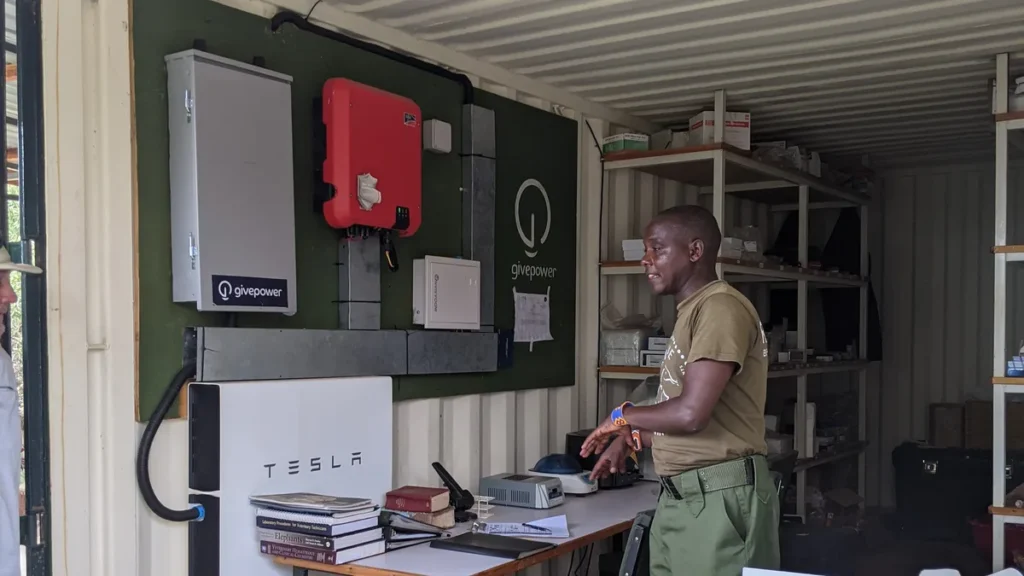
The best AI tools for home battery installation startups in 2026 are the ones that help you size the storage right, pair the inverter correctly, price the whole job honestly, and get a battery system running safely before the next power cut arrives. A home battery installation is not a quick electrical job and it is not a solar panel job with a battery added as an afterthought. A homeowner is trusting you with the power for their whole house when the grid goes down, and the work has to pass inspection the first time. Every part of the job is connected: the load calculation decides the battery size, the battery size decides the inverter and the backup panel, and the backup panel decides the wiring, the permits, and the final price. That chain is what makes this trade different from other electrical work.
A wrong size is not a small mistake. A battery that is too small will drain before the night is over, leaving the fridge warm and the customer angry, Good software earns its keep by keeping the numbers honest: the kilowatt-hours the household actually uses after dark, the circuits that must stay live in an outage, the inverter rating that can start the well pump without tripping, and the cost of the battery, the inverter, the backup panel, the wiring, the permit, and the inspection, all on one quote the customer can understand.
This guide compares nine tools across the work a young home battery installation business actually does: sizing storage from a home walkthrough and a year of usage data, designing systems that pair batteries with inverters and existing solar, quoting installation jobs that include the backup circuits and the permit, scheduling installs around inspection dates, tracking permits and utility approvals, monitoring installed batteries so faults are caught before the customer notices, answering leads from homeowners who have just lost power, and winning the reviews that bring in the next street of customers. It stays focused on the battery system and the customer who expects the lights to stay on the next time the grid fails.
Key Takeaways
- Start with one storage design tool, one battery monitoring platform, and one AI answering tool. Those three carry most of the revenue for a new home battery installation startup.
- Sizing is the product. Tools that model evening usage, backup circuits, and inverter limits on one job file stop undersized installs and oversized quotes alike.
- Quote the whole installation, not the battery alone. A clear price that includes the battery, the inverter, the backup panel, the wiring, the permit, and the inspection wins more work than a low battery price followed by surprises.
- Permits and utility approvals are the quiet bottleneck. A diary built only for installation days will break the first time an inspector asks for a change and the next job has to move.
- Monitoring is the repeat business. A battery that is watched and serviced after installation turns a one-off job into a customer who calls you first for the second battery.
Best AI Tools for Home Battery Installation Startups at a Glance
The table below gives a quick view of where each tool helps most in a battery installation business.
| Tool | Main Job | Standout Feature for Battery Installs | Pricing Model |
|---|---|---|---|
| Aurora Solar | Storage-aware system design | Battery sizing with inverter pairing and shade modelling | Per user, monthly |
| OpenSolar | Battery modelling and proposals | Storage cashflow and payback figures homeowners understand | Free tier, then per user |
| HelioScope | Storage system design | Detailed layouts with battery and inverter placement | Per project or monthly |
| Enphase Enlighten | Battery monitoring and fleet care | Per-battery health, alerts, and remote diagnostics | Included with hardware |
| Tesla Powerwall app | Homeowner battery control | Backup reserve, Storm Watch, and self-consumption modes | Included with hardware |
| SolarEdge monitoring platform | Inverter and battery monitoring | Panel-level and battery-level visibility on one dashboard | Included with hardware |
| Scanifly | Drone site surveys | Roof and wall measurements for battery and inverter placement | Per survey or monthly |
| BuildOps | Install operations and scheduling | Dispatch, permits, and job costing on one job file | Per user, monthly |
| Smith.ai | AI call answering | Answers leads, qualifies jobs, and books surveys | Monthly subscription |
How a Home Battery Installation Startup Really Works
A home battery installation startup earns its living from planned, multi-day jobs, and the work starts long before anyone lifts a battery onto a wall. Most jobs begin with a walkthrough: the installer walks the property with the homeowner, lists the circuits that matter most in an outage, checks the electrical panel, looks at where the battery can sit safely, and finds the route for the inverter and the backup panel. That visit produces the two numbers the whole job depends on. The first is the load, the total of the evening kilowatt-hours and the starting watts for the fridge, the furnace fan, the well pump, the sump pump, the lights, and whatever else the customer wants running when the grid is down. The second is the price, and it has to cover the battery, the inverter, the backup panel, the wiring, the permit, and the inspection.
Between the quote and the finished job sits the part of the business that new founders underestimate: waiting. Permits take days, and some towns want a single-line diagram, a battery specification sheet, and a load calculation before they will sign off. The utility may need to approve the interconnection, and the battery delivery date decides the installation date. A good installation diary has room for all of that, with the permit, the delivery, the panel work, the battery mounting, the inverter wiring, and the inspection all tracked against the same job.
Most battery jobs arrive alongside solar, because a battery stores the power the panels make during the day for use at night. That pairing is the reason the design tools below matter so much: the battery, the inverter, and the panels have to be sized as one system, not three separate purchases. A startup that understands that pairing can sell a complete home energy system, and the best AI tools for solar installation startups cover the panel side of that same job. The battery installer who can talk fluently about both halves of the system wins the work that a battery-only or solar-only firm cannot.
The work after installation matters as much as the install itself. A battery reports its charge, its health, and its faults, and the customer will call when the app shows something they do not understand. The startups that grow watch their installed fleet, answer those calls quickly, and turn one install into a service plan, a second battery sale, and a referral. The tools below are judged on that whole arc: design, quote, permit, install, monitor, and repeat.
1. Aurora Solar
Aurora Solar is the design tool most battery installers reach for first, because it treats storage as part of the system rather than an accessory. You draw the roof, place the panels, add the battery, and the software models how much solar the home will produce, how much the battery will store, and how much of the evening load it will actually cover. That last number is the one that decides whether the quote is honest. A design that shows the customer exactly which circuits the battery will keep running, and for how long, prevents the two failures that sink new battery startups: a system that dies at midnight and a customer who feels misled.
The AI shading and imagery tools matter for battery work in a quiet way. A roof with heavy afternoon shade produces less power to store, which changes the battery size, the payback, and the honest answer to the customer. Aurora builds that into the proposal automatically, so the founder does not have to do the sums by hand at the kitchen table. The proposal itself is the selling tool: a clean document with the system layout, the expected backup hours, the savings, and the price, sent the same evening as the survey. Speed wins battery jobs, because the homeowner comparing three quotes hires the company that responds first and explains the numbers best.
Where Aurora earns its monthly fee is accuracy at scale. Once the first ten designs are done, the templates, the battery models, and the pricing carry over, so each new quote takes minutes instead of an evening. Use Aurora to design fast, then confirm the battery location, the inverter route, and the backup panel on site before the quote becomes a promise.
2. OpenSolar
OpenSolar is the budget-friendly way into proper battery design, with a free tier that covers the core work a new startup needs: system design, battery modelling, and proposals. The battery modelling is the feature that matters most here. You set the battery size, the usable capacity, the round-trip efficiency, and the backup circuits, and OpenSolar shows the customer how the system behaves through a normal day and through an outage. That simulation turns an abstract kilowatt-hour figure into something a homeowner can picture: the fridge, the lights, and the internet staying on until morning.
The cashflow and payback figures are the second reason OpenSolar fits battery startups. A battery is a large purchase with a long payback, and customers ask hard questions about whether it is worth the money. OpenSolar lays out the savings from self-consumption, the value of backup power, and the effect of time-of-use tariffs in plain figures, so the founder can answer honestly instead of guessing. A quote that shows the maths builds more trust than a quote that hides it, and trust is what closes a five-figure install.
OpenSolar also handles the unglamorous side of the job: customer records, quotes, and follow-up. Every survey, design, quote, and payment sits on one record per home, which stops the classic startup failure of losing a warm lead in a spreadsheet. The free tier means a founder can start with no software bill at all. The trade-off is that the most advanced battery features sit on the paid plans, so budget for the upgrade once installs become weekly.
3. HelioScope
HelioScope is the detailed design tool for battery installs where precision decides the price. It builds the full electrical layout: panel strings, inverter inputs, battery connections, and the backup panel, with shade modelling that runs hour by hour through the year. For a battery startup, that detail matters because the inverter is the heart of the system. An inverter that is undersized for the battery will clip output and waste stored power, while an inverter that is oversized costs money the customer did not need to spend. HelioScope shows both problems before anyone orders hardware.
The layout tools also help with the physical install. Battery placement is not free-form: the unit needs clearance, ventilation, a solid wall, and a short cable run to the inverter and the panel. HelioScope lets the designer place the battery and the inverter on the plan, measure the runs, and hand the crew a drawing that matches the house. That drawing becomes part of the permit pack too, which shortens the approval wait in towns that ask for a single-line diagram with the application.
HelioScope is priced per project or monthly, which suits a startup that designs in bursts. The learning curve is steeper than the simpler proposal tools, so learn it properly in the first month. Used well, it stops the expensive mistakes: the wrong inverter, the battery that does not fit the wall, and the permit that comes back because the diagram was wrong.
4. Enphase Enlighten
Enphase Enlighten is the monitoring platform that comes with Enphase battery systems, and for a startup that installs Enphase hardware it is the tool that turns a one-off install into a service relationship. Every installed battery reports its charge level, its health, and its faults to one dashboard, so the founder can see the whole fleet at a glance. A battery that stops charging, a cell that runs hot, or a firmware update that fails shows up as an alert before the customer notices anything wrong, and that early warning is the difference between a quick remote fix and an angry phone call.
The per-battery detail matters on service visits. Enlighten shows the charge and discharge history, the backup events, and the self-consumption pattern for each home, so the installer arrives knowing what the system did during the last outage instead of asking the customer to describe it. That history also settles the arguments every battery installer faces: the customer who says the battery did not last the night, when the data shows the air conditioner ran for six hours.
Enlighten also gives the homeowner their own view of the system, which reduces support calls. A customer who can see the battery charging from the afternoon sun and discharging after dark understands the system and trusts it. For the startup, the platform is effectively free with the hardware, which makes it one of the cheapest ways to run a professional monitoring service. The limitation is obvious: it only watches Enphase systems, so a startup that installs several battery brands needs a monitoring answer for each one.
5. Tesla Powerwall App
The Tesla Powerwall app is the homeowner-facing side of the most recognisable home battery on the market, and a startup that installs Powerwalls needs to know it inside out. The app shows the battery charge, the solar production, the home usage, and the grid flow on one screen, and it lets the customer set the backup reserve: the share of the battery kept in reserve for an outage. That single setting is the source of most Powerwall support calls, because a customer who sets the reserve to zero will find the battery empty when the power fails, and a customer who sets it to one hundred will never use the battery at all.
Storm Watch is the feature that sells the system and the feature the installer must explain. When a severe weather warning is issued, the app charges the battery to full from the grid or the solar, so the home is ready for the outage before it happens. A founder who demonstrates Storm Watch on the handover visit gives the customer a story to tell the neighbours, and that story is worth more than any advertisement. The app also handles time-based control, charging when electricity is cheap and discharging when rates peak, which is where the savings figures in the quote come from.
For the startup, the app is also a diagnostic tool. The installer can check the battery status, the firmware version, and the backup history during a service visit, and can show the customer exactly what happened during the last outage. The limitation is the same as with Enphase: the app only covers Tesla systems. A startup that sells several brands should keep its own fleet records in one place rather than relying on each brand’s app alone.

6. SolarEdge Monitoring Platform
The SolarEdge monitoring platform covers the inverter and the battery on one dashboard, which is exactly the view a battery installer needs. SolarEdge inverters pair with SolarEdge batteries, and the platform shows panel-level production, inverter performance, and battery charge and discharge together. That combined view is what makes fault-finding fast: a battery that is not charging could be a battery fault, an inverter fault, or a panel fault, and the dashboard shows which one in seconds instead of an afternoon of testing on site.
The panel-level visibility is the feature that sets SolarEdge apart for battery work. Each panel reports its own output, so a shaded or failing panel shows up individually rather than dragging the whole system down silently. That matters because the battery can only store what the panels produce, and a system that quietly loses a fifth of its production will leave the battery half empty every evening.
Like the other brand platforms, SolarEdge monitoring is included with the hardware, so the startup pays nothing extra to watch its fleet. The platform also supports the installer with fleet-level alerts, so one person can watch a hundred installed systems and only visit the ones that need attention. The best AI tools for energy management cover the wider question of how those systems shift load and cut bills, and a battery startup that understands both the hardware monitoring and the energy management story can sell the system on savings as well as on backup. The weakness is brand lock-in again: the dashboard only sees SolarEdge equipment, so mixed-brand fleets need more than one login.
7. Scanifly
Scanifly is the drone survey tool that lets a battery startup measure a property without climbing on the roof. The drone flies the roof, photographs the panels and the walls, and the software builds a measured model the designer can work from at the office. For battery work, the survey answers the questions that decide the install: where the battery can mount, where the inverter can sit, how the cable runs from the roof to the panel, and whether the wall is strong enough to hold the unit. Getting those answers from the office saves a ladder visit and shortens the time between the first call and the quote.
The accuracy of a Scanifly survey protects the margin. A battery install priced from a guess about cable runs and wall conditions is a quote that will grow on the day, and a quote that grows on the day loses trust. A measured survey lets the founder price the wiring, the conduit, and the mounting hardware correctly the first time, and the 3D model becomes part of the customer record, so the crew arrives knowing the site before they unload the van. The photos also become the before-and-after record that proves the quality of the work.
Scanifly is priced per survey or monthly, which suits a startup that surveys in batches. The drone is an extra cost and needs a licensed operator in many areas, so check the local rules before buying one. Used well, it pays for itself by cutting survey visits in half and stopping the site surprises that eat a day of crew time.
8. BuildOps
BuildOps is the operations platform that holds a battery installation business together once the diary fills. It combines scheduling, dispatch, job costing, permits, and invoicing on one job file, so the founder can see every install, every permit, and every invoice without opening five apps. For battery work, the permit tracking is the feature that matters most. Each job carries its permit application, its utility approval, its inspection date, and its documents, and the system flags the jobs that are waiting on someone else before they stall for weeks.
The scheduling tools handle the reality of battery installs: multi-day jobs, crews that split between sites, and inspections that move at short notice. BuildOps lets the dispatcher move a job, reassign a crew, and notify the customer from the same screen, which stops the double-bookings and missed inspections that cost a startup its reputation. Job costing tracks every battery, inverter, cable, and hour against the quote, so the founder knows which jobs made money instead of finding out at the end of the month.
BuildOps is priced per user monthly, so adopt it once installs are weekly rather than monthly. The alternative is a patchwork of a calendar, a spreadsheet, and a messaging app, and that patchwork breaks at exactly the moment the business starts growing.
9. Smith.ai
Smith.ai is the AI answering service that makes sure a battery startup never misses a lead, and in this trade the missed call is the lost job. Homeowners ring battery installers after a power cut, in the evening, and at the weekend, which is exactly when a two-person startup is on a roof or at home. Smith.ai answers every call, qualifies the job, and books the survey into the diary, so the founder returns from the install to a booked survey instead of a voicemail the customer has already replaced with a call to the next company.
The qualification matters as much as the answering. Smith.ai asks the questions that separate a real battery job from a tyre-kicker: the size of the home, the existing solar, the reason for the battery, and the budget range. That screening saves the founder from driving to surveys that were never going to close, and it means the surveys that do get booked are the ones worth winning. It also confirms survey times and sends reminders, which cuts the no-shows that waste a morning.
Smith.ai is a monthly subscription, and the cost is easy to justify against a single saved job: one battery install pays for months of answering. The risk is over-automation. A customer who wants to talk about a five-figure battery system will eventually want a human, so the service should book the survey and hand over, not try to close the sale itself. Used that way, it is the cheapest member of the team a battery startup will ever hire, and the one that works every evening and weekend without complaint.
Home Battery Installation Startup Checklist
Use this checklist before the first install, and run through it again every month until the routine is automatic.
- Pick one storage design tool and learn it properly. Design ten practice systems before the first paid quote, and check every battery size and inverter pairing by hand.
- Build a single job file per home. Every survey, design, quote, permit, install photo, test result, and payment goes on the same record, so nothing is lost between the first call and the final inspection.
- Price the whole installation on every quote. Battery, inverter, backup panel, wiring, permit, and inspection on one clear price, with the backup hours the system will actually deliver written next to it.
- Track every permit and utility approval to its inspection date. A job that waits on paperwork is a job that is not earning, and a diary that shows the waiting jobs is the only way to chase them.
- Set up monitoring on every installed battery before you leave the site. Show the customer the app, set the backup reserve together, and test the backup by switching the system to island mode before handover.
- Ask for the review at the handover, not a month later. A customer standing in front of a working battery, with the lights on and the app open, is the customer most likely to leave the review that brings the next street.
Frequently Asked Questions
How much do AI tools cost for a new home battery installation startup?
A sensible starting stack costs little in the first months. OpenSolar covers design and proposals on a free tier, the monitoring platforms from Enphase, Tesla, and SolarEdge come with the hardware, and a single AI answering subscription is the only real monthly bill. Budget for a paid design tool and an operations platform once installs become weekly. The tools pay for themselves in saved survey visits, fewer revisits, and jobs that would otherwise have gone to the company that answered first.
Can AI really size a home battery without a site visit?
AI can size a battery well from usage data, roof imagery, and a load list, but it cannot replace the walkthrough. The software models the numbers, and the visit confirms the wall, the panel, the cable route, and the circuits the customer actually wants backed up. The startups that get sizing right use both: the design tool for the maths, and the site visit for the facts the maths cannot see. A quote built on imagery alone is a guess, and a battery is too expensive to guess about.
Do I need separate tools for design, permits, and monitoring?
Yes, and that is normal. No single tool covers storage design, permit tracking, and fleet monitoring well. The design tool sizes the system, the operations platform tracks the permit and the diary, and the brand monitoring platform watches the installed battery. Keep the stack small and one record per home that ties them together.
What should a battery proposal include to win the job?
A winning proposal shows the battery size, the inverter pairing, the backup circuits and how long they will run, the full installed price with no hidden extras, the permit and inspection included, and the expected savings in plain figures. It should arrive the same evening as the survey, with a clear layout drawing and a handover promise. Homeowners compare three quotes, and the one that explains the numbers best usually wins, even when it is not the cheapest. A related question is whether the same crew can handle the charger work too, and the best AI tools for EV charger installation startups show how much of that trade shares the same panel and permitting skills.
How do battery and solar installs work together?
Most battery installs pair with rooftop solar, because the battery stores the daytime solar power for evening use. The design tools above model both halves as one system: the panels produce, the inverter converts, and the battery stores. A startup that can design, quote, and install the combined system wins work that a battery-only firm cannot.
How do I get my first reviews as a new battery installer?
Ask at the handover, when the system is working and the customer is happiest. Show the customer the app, run the backup test together, and then ask for a review while the experience is fresh. A short message with the review link, sent the same evening, gets far more responses than a request sent a month later. The first five reviews matter most, because they are what the next homeowner reads before ringing, so make the handover visit the moment the review is won.
The Bottom Line
The best AI tools for home battery installation startups in 2026 do not replace the electrician. They replace the evening of paperwork, the guessed battery size, the lost lead, and the permit that nobody chased. Start with a storage design tool that models the battery, the inverter, and the backup circuits as one system, add the monitoring platform that comes with the hardware you install, and put an AI answering service on the phone so no lead is ever missed. Learn the stack on ten practice designs, price every job as a complete installation, and ask for the review at the handover.

Keep what speaks to you.
Leave room for your own perspective.